Brother MFC-L3780CDW Color Laser All-in-OneBest overall
- Type
- Color laser all-in-one
- Print speed
- Up to 31 ppm
- Scan speed
- Up to 29 / 22 ipm (black / color)
- Functions
- Print, copy, scan, fax
Most recommended by reviewers
Check price at AmazonWe earn a commission when you buy through our links, at no extra cost to you. How this works.
If you need one machine that prints, copies and scans, you have a few big choices to make. Laser or inkjet, whether you need fax, and how many pages you print each month will shape your running costs more than almost anything else.
Our top pick is the Brother MFC-L3780CDW. It is a color laser all-in-one with fax and single-pass duplex scanning, and it suits home offices and small teams that print often. The other picks cover a mono laser for home offices, a budget inkjet with a feeder, a high-volume mono laser, and two Epson photo printers for larger images.
1 Brother MFC-L3780CDW Color Laser All-in-One | 2 Brother MFC-L2900DW XL Mono Laser All-in-One | 3 Canon PIXMA TR7120 Wireless Color Inkjet All-in-One | 4 Brother MFC-L5915DW High-Speed Mono Laser All-in-One | 5 Epson Expression Photo XP-8800 Wireless All-in-One | 6 Epson Expression Photo XP-980 Wireless Wide-Format All-in-One | |
|---|---|---|---|---|---|---|
| Best for | Best overall | Best mono laser for a home office | Best budget all-in-one | Best for high-volume printing | Best for everyday photos | Best for larger prints |
| Type | Color laser all-in-one | Monochrome laser all-in-one | Color inkjet all-in-one | Monochrome laser all-in-one | Color inkjet all-in-one | Color inkjet all-in-one, wide format |
| Connectivity | Dual-band Wi-Fi, Gigabit Ethernet, Wi-Fi Direct, USB, NFC | Not listed | Not listed | Dual-band Wi-Fi and built-in Gigabit Ethernet | Not listed | Ethernet, USB, Wi-Fi, Wi-Fi Direct and mobile printing |
| Toner options | TN229 standard, XL and XXL yields | Up to 4,200 pages | Not listed | TN920UXXL replacement toner, up to 18,000 pages | Not listed | Not listed |
| Feeder | Not listed | 50-page auto document feeder with single-pass duplex scanning | Auto document feeder for multi-page scanning and copying | 70-page auto document feeder with single-pass two-sided scanning up to 56 ipm | Not listed | Not listed |
| Display | Not listed | 3.5-inch touchscreen | Not listed | Not listed | 4.3-inch color touchscreen | 4.3-inch color touchscreen |
| Ink | Not listed | Not listed | 2-cartridge hybrid ink system | Not listed | Six-color Claria Photo HD | Six-color Claria Photo HD |
| Check price at Amazon | Check price at Amazon | Check price at Amazon | Check price at Amazon | Check price at Amazon | Check price at Amazon |
Brother MFC-L3780CDW Color Laser All-in-OneBest overallMost recommended by reviewers
Check price at Amazon Brother MFC-L2900DW XL Mono Laser All-in-OneBest mono laser for a home office
 Canon PIXMA TR7120 Wireless Color Inkjet All-in-OneBest budget all-in-one
 Brother MFC-L5915DW High-Speed Mono Laser All-in-OneBest for high-volume printing
 Epson Expression Photo XP-8800 Wireless All-in-OneBest for everyday photos
 Epson Expression Photo XP-980 Wireless Wide-Format All-in-OneBest for larger prints


A color laser all-in-one with fax, built for home offices and small teams that print every week.
Most recommended by reviewers
Check price at AmazonPrices and availability on Amazon change often.
One catchThe 30-sheet multipurpose tray is modest for heavier daily use.
The MFC-L3780CDW gives you color laser output, copying, scanning and fax in one machine. The expert review that ranked it first praised its output quality and its relatively low print costs, which matter if you print every week.
Single-pass duplexing on the feeder means multi-page double-sided copies and scans finish quickly. Dual-band Wi-Fi, Ethernet and NFC make it easy to share across a small office, and the toner range lets you pick the yield that suits your volume.


A compact black-and-white laser with fax, duplex copying and a high-yield toner in the box.
Prices and availability on Amazon change often.
If your work is mostly text, invoices and forms, the MFC-L2900DW XL covers what a small office needs. The expert review that chose it noted that it delivers every feature a small office needs, including duplexing for copying, scanning and faxing.
The high-yield toner in the box keeps running costs low at the start, and the touchscreen makes cloud printing simple. Plan for the separate imaging unit replacement over time.


A low-cost color inkjet with a feeder and automatic 2-sided printing for light home use.
Prices and availability on Amazon change often.
The TR7120 is the lowest-cost option here with a feeder and automatic duplexing. It handles the everyday mix of documents, school forms and occasional color pages that most homes produce.
Setup from a phone or computer is quick, and dual-band Wi-Fi keeps connections steady across a home. For heavier printing, the laser picks on this page will cost less per page over time.


A fast mono laser with a 70-page feeder and a large toner option, for workgroups that print a lot.
Prices and availability on Amazon change often.
The MFC-L5915DW is built for offices where the printer runs all day. The 50 ppm speed and 70-page feeder keep queues short, and the legal-size flatbed handles awkward documents.
The expert review that picked it highlighted its low cost per page, which is the number that matters once volume is high. Expect slower two-sided printing than one-sided.


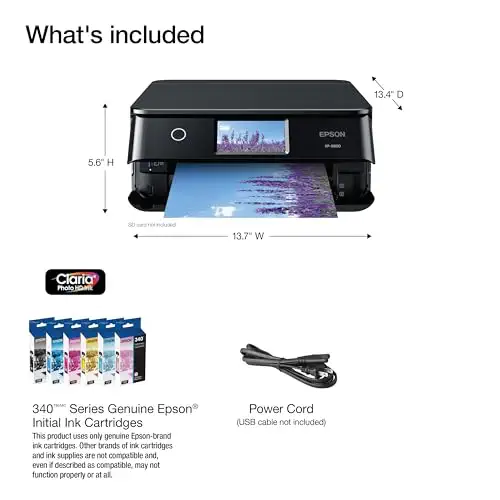
A six-color photo printer that makes borderless letter-size prints and handles scanning and copying.
Prices and availability on Amazon change often.
If you print family photos or creative projects at home and still need a scanner and copier, the XP-8800 covers both. The expert review that picked it praised the high-quality photo output and the six-color ink system.
Skip it if you scan stacks of pages, since there is no feeder. For printing larger than letter size, see the XP-980 below.


A six-color printer for borderless prints up to 11 x 17 inches, with Ethernet and USB connections.
Prices and availability on Amazon change often.
The XP-980 is the pick if you print posters, large photos or creative projects bigger than letter size. The expert review noted its top-tier borderless prints up to 11 x 17 inches and its printable-disc support.
Because it holds only one sheet of tabloid paper at a time, it suits occasional large prints rather than heavy daily work.
Home users who print a few times a week do well with the budget inkjet or the compact mono laser. Small offices that print daily, or need color and fax, should look at the color laser all-in-one or the high-volume mono laser.
If photos matter more than documents, the Epson photo printers are better fits than any laser on this list.
Skip a laser if your printing is mostly photos, and skip an inkjet if you print hundreds of pages a month. If you need fax, check the listing first, because several models here do not include it.
For light home use with a feeder, the Canon PIXMA TR7120 is the low-cost option. If you print often and need color, the Brother MFC-L3780CDW is the stronger choice.
The Brother MFC-L3780CDW suits small offices that need color and fax. For black-and-white work at higher volume, the Brother MFC-L5915DW is the faster option.
The Brother MFC-L3780CDW and the Brother MFC-L2900DW XL both list fax in their features. Most other models here do not list fax, so check the listing before you buy.
The Brother MFC-L3780CDW is the top pick, with color laser output, duplex copy and scan, and fax. An expert review ranked it first for its output quality and low print costs.
Laser models are usually better for high-volume text printing and lower cost per page. Inkjets are better for photos and lighter use, with lower upfront cost.
Why trust BullseyeBuy
Every pick is sold by Amazon.com and was in stock when the shortlist was checked. We compared the listings with editorial reviews on print speed, scanning, fax, toner yield and running cost.
Our expert team tests products when it is needed and researches online and in interviews. Every guide is fact-checked and edited by a real person.
The BullseyeBuy editorial team · Updated Oct 17, 2026
How we pickEditorial standardsAffiliate disclosureReport a mistake
We earn a commission when you buy through our links, at no extra cost to you. It never decides the winner.