BullseyeBuy

The Best Affordable Digital Notebooks

We earn a commission when you buy through our links, at no extra cost to you. How this works.

You like writing by hand, but you also want your notes on your phone. A full e-ink tablet can cost far more than you want to spend. A smart pen used with a paper notebook is a cheaper way to get both. Here is what's available right now, including what's in the box, how notes export, battery or charging needs, and whether the app charges a fee. Most of these pens read special paper, so you'll buy matching notebooks later.

Our top pick is the Ophaya Smart Digital Notebook and Smart Pen (5-pack). It suits students and busy workers who fill pages fast. You get five A5 notebooks, handwriting-to-Word conversion and audio-linked notes. The other picks cover the lowest price, a no-subscription cloud, a pen with no battery and a bundle with a writing board.

The rundown

1Ophaya Smart Digital Notebook and Smart, best affordable digital notebookOphaya Smart Digital Notebook and Smart Pen (5-pack)2Yuan Smart Digital Notebook, best affordable digital notebookYuan Smart Digital Notebook with Smart Pen3SyncPen Digital Notebook Smart Pen Set, best affordable digital notebookSyncPen Digital Notebook Smart Pen Set4HUION Note Digital Notebook, best affordable digital notebookHUION Note Digital Notebook5Ophayapen Smart Pen & Smart Digital, best affordable digital notebookOphayapen Smart Pen & Smart Digital Notebook
Best forBest overallBest budgetBest with no subscriptionBest pen with no chargingBest bundle with a writing board
Notebooks5 x A5, 124 pages (62 sheets) each1 smart notebook (13 x 21 cm) plus 1 mini notebookA5, 128 pagesNot listedNot listed
AudioRecords audio linked to your writingNot listedAudio recordingRecords audio synced to your notes, with playbackTap a word to jump to the matching audio
ExportPDF, Word, PNG, GIF, MP4PDF or image filesNot listedImage, PDF or MP4PDF, Word, PNG, GIF, MP4, with pages combinable
OfflineSaves offline, syncs when onlineUp to 15 offline notesSaves offline, syncs on reconnectNot listedNot listed
AppOphaya Pro+ (iOS and Android)Fountain pen, pencil, pastel, eraserLifetime access, no recurring feesHuion Note, free (iOS and Android)Not listed
Check price at AmazonCheck price at AmazonCheck price at AmazonCheck price at AmazonCheck price at Amazon
1Best overall
Ophaya Smart Digital Notebook and Smart, best affordable digital notebookOphaya Smart Digital Notebook and Smart, best affordable digital notebook, view 2Ophaya Smart Digital Notebook and Smart, best affordable digital notebook, view 3Ophaya Smart Digital Notebook and Smart, best affordable digital notebook, view 4Ophaya Smart Digital Notebook and Smart, best affordable digital notebook, view 5
1 / 5

Ophaya Smart Digital Notebook and Smart Pen (5-pack)
A smart pen with five A5 notebooks that turns handwriting into searchable, shareable notes.

Notebooks
5 x A5, 124 pages (62 sheets) each
In the box
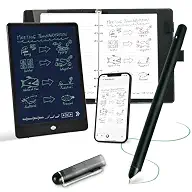
Smart pen, 4 ballpoint refills, USB cable, manual
Text conversion
OCR to editable Word text
Search
Keywords, tags or timestamps
Audio
Records audio linked to your writing
Export
PDF, Word, PNG, GIF, MP4
Offline
Saves offline, syncs when online
App
Ophaya Pro+ (iOS and Android)

Most recommended by reviewers

Check price at Amazon

Prices and availability on Amazon change often.

Why it wins

  • Five A5 notebooks of 124 pages each are included, so you have plenty of paper
  • Converts handwriting to editable Word text and makes notes searchable
  • Audio recording linked to your writing for lectures and meetings
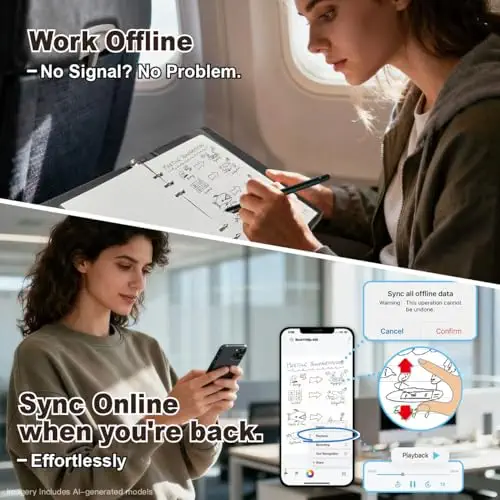
  • Saves offline and syncs when you reconnect

One catchThe pen needs Ophaya's own paper once these five notebooks run out.

Why it's our top pick

The Ophaya set is the best starter for people who fill a lot of pages. Five A5 notebooks of 124 pages each come in the box, plus four ballpoint refills and a USB cable, so paper and ink aren't a worry early on. Expert guides say to match the device to how you actually work, and this one fits note-heavy students and meeting-goers.

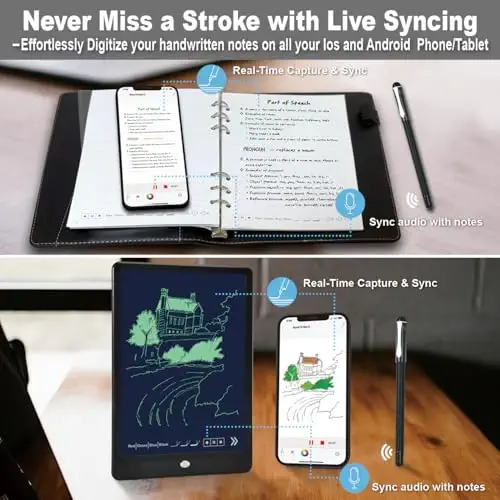
The free Ophaya Pro+ app syncs your writing to your phone or iPad, converts it to editable Word text with OCR, and lets you search by keyword, tag or timestamp. You can record audio while you write and tap a note to replay it. Notes save offline and sync once you're back online.

2Best budget
Yuan Smart Digital Notebook, best affordable digital notebookYuan Smart Digital Notebook, best affordable digital notebook, view 2Yuan Smart Digital Notebook, best affordable digital notebook, view 3Yuan Smart Digital Notebook, best affordable digital notebook, view 4Yuan Smart Digital Notebook, best affordable digital notebook, view 5
1 / 5

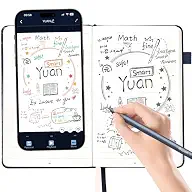
Yuan Smart Digital Notebook with Smart Pen

The lowest-priced set on our shortlist, with local-only storage and a long-lasting pen battery.

Notebooks
1 smart notebook (13 x 21 cm) plus 1 mini notebook
Pages
187
Pen battery
Up to 8 hours writing, 110 days standby
Charging
About 1.5 hours, fast charge
Offline memory
Up to 15 offline notes
App tools
Fountain pen, pencil, pastel, eraser
Export
PDF or image files
Storage
Local on your device, no cloud required
Check price at Amazon

Prices and availability on Amazon change often.

Pros

  • Lowest price on our shortlist
  • Notes stay on your device, with an option to sync to a private cloud
  • Long battery life and fast charging
  • Can replay your writing process as a video
  • Includes a mini notebook for quick notes

Cons

  • Handwriting on the notebook can't be erased, and the pen only works with Yuan notebooks
  • The listing doesn't mention handwriting-to-text conversion
  • Exports are PDF or image only
  • The first charge can take several hours
Read our full take

Why we like it

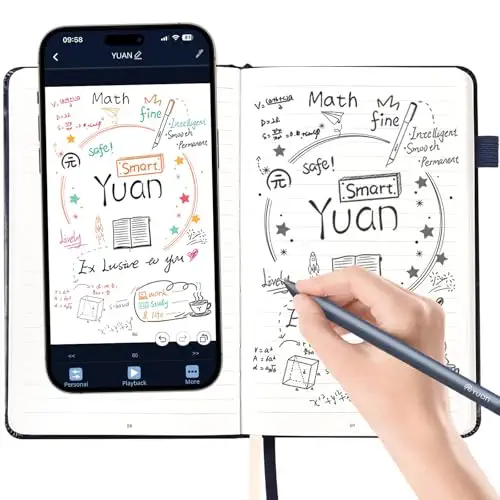
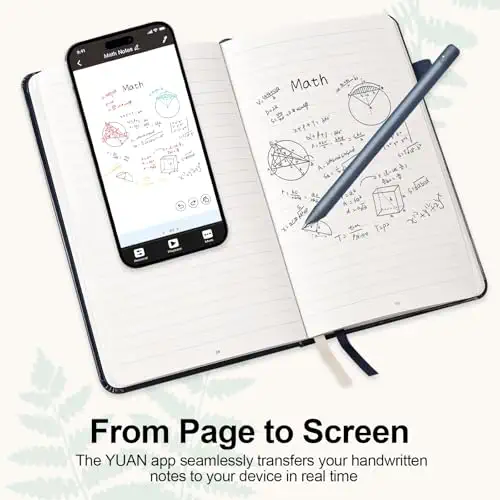
The Yuan set is the lowest-priced option here, and it still covers the basics. A notebook (13 x 21 cm, acid-free paper, usable on both sides) and a mini notebook come with the pen, which captures your strokes in real time and sends them to the Yuan app on your phone or iPad.

It stands out for privacy and battery life. the maker says notes are stored locally with no cloud, with an option to sync to your own private cloud, and the pen runs up to 8 hours per charge and 110 days on standby. The trade-off is fewer export options and no listed text conversion.

3Best with no subscription
SyncPen Digital Notebook Smart Pen Set, best affordable digital notebookSyncPen Digital Notebook Smart Pen Set, best affordable digital notebook, view 2SyncPen Digital Notebook Smart Pen Set, best affordable digital notebook, view 3SyncPen Digital Notebook Smart Pen Set, best affordable digital notebook, view 4SyncPen Digital Notebook Smart Pen Set, best affordable digital notebook, view 5
1 / 5

SyncPen Digital Notebook Smart Pen Set

A smart pen set with lifetime app access, handwriting recognition in 71+ languages and cloud storage.

Notebook
A5, 128 pages
App cost
Lifetime access, no recurring fees
Handwriting recognition
71+ languages, incl. math and music notation
Cloud
Unlimited storage, AES 256 encryption
Search
Keywords, tags or recognized text
Audio
Audio recording
Offline
Saves offline, syncs on reconnect
Check price at Amazon

Prices and availability on Amazon change often.

Pros

  • No recurring app fees
  • Recognition in 71+ languages, including math equations
  • Cloud backup with AES 256 encryption
  • Searchable by keyword, tag or recognized text

Cons

  • The set lists a single 128-page notebook
  • Export formats aren't listed
  • Recognition and security claims come from the seller's listing alone
Read our full take

Why we like it

SyncPen is the pick for anyone wary of app fees. The listing promises lifetime app access with no recurring charges, plus unlimited cloud storage with AES 256 encryption, so your notes stay backed up across devices without a monthly bill.

Handwriting recognition covers 71+ languages, including math equations and music notation, and notes are searchable by keyword, tag or recognized text. You write in a 128-page A5 notebook, and notes save offline and sync when you reconnect. These claims come from the seller, so check the app's free features before you rely on them.

4Best pen with no charging
HUION Note Digital Notebook, best affordable digital notebookHUION Note Digital Notebook, best affordable digital notebook, view 2HUION Note Digital Notebook, best affordable digital notebook, view 3HUION Note Digital Notebook, best affordable digital notebook, view 4HUION Note Digital Notebook, best affordable digital notebook, view 5
1 / 5

HUION Note Digital Notebook

A battery-free pen that sends your A5 notepad writing to the Huion Note app as vector lines.

Pen
Battery-free
Paper
A5 notepad included
App
Huion Note, free (iOS and Android)
Audio
Records audio synced to your notes, with playback
Export
Image, PDF or MP4
Editing
Merge, split or move pages, highlighter
Sync
Real-time and offline
Check price at Amazon

Prices and availability on Amazon change often.

Pros

  • No pen battery to charge
  • Audio recording that replays your handwriting process
  • Page tools: merge, split, move and highlight
  • Shares as image, PDF or MP4

Cons

  • Costs more than the Ophaya, Yuan and SyncPen sets
  • No handwriting-to-text conversion listed
  • Works through a mobile app only
Read our full take

Why we like it

The Huion Note pen has no battery to charge, which suits anyone who forgets to plug things in. You write on the included A5 notepad, and each stroke is captured as vector lines and sent to the free Huion Note app on iOS or Android.

You can record audio to sync with your notes and replay the writing process. The app lets you merge, split or move pages into groups, highlight key ideas, and share as images, PDF or MP4. It doesn't list text conversion, so it suits sketches and quick notes more than searchable text.

5Best bundle with a writing board
Ophayapen Smart Pen & Smart Digital, best affordable digital notebookOphayapen Smart Pen & Smart Digital, best affordable digital notebook, view 2Ophayapen Smart Pen & Smart Digital, best affordable digital notebook, view 3Ophayapen Smart Pen & Smart Digital, best affordable digital notebook, view 4Ophayapen Smart Pen & Smart Digital, best affordable digital notebook, view 5
1 / 5

Ophayapen Smart Pen & Smart Digital Notebook

A pen, 60-sheet notebook and writing board bundle that syncs to phones and tablets over Bluetooth.

In the box
Pen, PU notebook (60 sheets), writing board, 4 refills, 2 nibs, cables
Connection
Bluetooth to the Ophaya Pro+ app
Text conversion
OCR to Word
Audio
Tap a word to jump to the matching audio
Export
PDF, Word, PNG, GIF, MP4, with pages combinable
Compatibility
iOS and Android phones and tablets, not computers
Check price at Amazon

Prices and availability on Amazon change often.

Pros

  • Writing board included in the bundle
  • Tap a word to jump to the matching audio
  • Combine pages into one PDF or image before sharing

Cons

  • The pen needs Ophaya's own paper
  • The app doesn't work on computers
  • The notebook has just 60 sheets
Read our full take

Why we like it

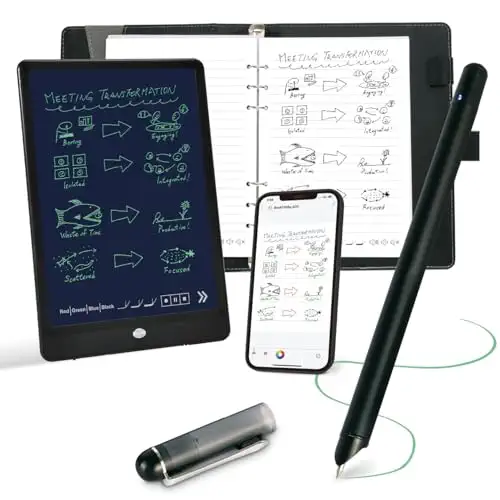
This Ophayapen bundle suits people who want everything in one box. It includes the pen, a 60-sheet PU notebook, a writing board, four ballpoint refills, two nibs and the charging cables.

The Ophaya Pro+ app converts handwriting to Word text, links notes to audio you can jump to by tapping a word, and exports to PDF, Word, PNG, GIF or MP4. Note that the app isn't compatible with computers, and the pen requires Ophaya's proprietary paper.

FAQ

Smart pen or e-ink tablet?

E-ink tablets give you a paper-like screen and long battery life, but they cost several times as much as a smart pen set. Even the cheaper e-ink models in expert guides skip features like a front light and color to hold the price down, and premium ones are called overkill for casual users.

A smart pen keeps real paper and sends your writing to your phone. Reusable wipe-clean notebooks you scan with your phone are another low-cost route. Their pages feel different from paper, and the ink can smear before it dries.

What should you look for in a affordable digital notebook?
  • Paper: most smart pens only read their own paper, so check refill notebooks are sold before you commit.
  • Text conversion and export: OCR to Word is useful if you want typed notes. Check which formats you can share.
  • Battery: pens vary from battery-free to hours per charge. Small pens are also easy to lose.
  • Fees and storage: look for no subscription and whether notes stay on your device or in the cloud.
  • Offline use: good sets save notes and sync when you reconnect.
Who should skip a smart pen?

Skip this category if you mainly read or mark up PDFs and textbooks, where a larger e-ink tablet fits better. Guides suggest matching the device to your workflow instead of buying a flagship you won't use.

Also skip it if you need to work on a computer. Some of these apps are phone and tablet only.

What is the best budget digital notebook?

Among the in-stock listings we compared, the Yuan set is the lowest-priced, and the Ophaya five-notebook set is our top pick for value because it includes five A5 notebooks and text conversion. SyncPen suits anyone who wants no app subscription, and Huion's pen needs no battery. Check live prices on Amazon before you buy.

Is it worth getting a digital notebook?

It's worth it if you handwrite often and want searchable, shareable notes without retyping them. A smart pen and notebook keeps the paper feel at a lower cost than an e-ink tablet. It's less worth it if you mostly read or annotate PDFs, or rarely take notes, since expert guides call premium models overkill for casual use.

Why trust BullseyeBuy

How we made this guide

  • 5 Expert guides read
  • 10 Products compared
  • 10 Listings checked in stock

The shortlist comes from ten Amazon listings compared on what's in the box, how notes sync and export, battery or charging needs, and whether any ongoing fees apply. Every product was in stock when we checked, and we read five expert guides to learn what matters when buying a digital notebook on a budget.

Our expert team tests products when it is needed and researches online and in interviews. Every guide is fact-checked and edited by a real person.

The BullseyeBuy editorial team · Updated Oct 17, 2026

Checking our work: 5 sources

We earn a commission when you buy through our links, at no extra cost to you. It never decides the winner.