 Thinlerain 27 Inch 2K Monitor With Pop-Up WebcamBest overall
- Resolution
- 2560 x 1440 (2K)
- Panel
- IPS, 178 degree viewing angles
- Refresh rate
- 100Hz
- Brightness
- 350 nits
Most recommended by reviewers
Check price at AmazonWe earn a commission when you buy through our links, at no extra cost to you. How this works.
Video calls are easier when your camera sits right at eye level and your speakers are already on the desk. A 27 inch monitor with a camera and speakers built in gives you that in one tidy piece, with no extra webcam or speakers to set up. Here is what's available right now.
Our top pick is the Thinlerain 27 Inch 2K Monitor With Pop-Up Webcam. It has a QHD IPS screen, a webcam that hides when you're done, a microphone and dual speakers. It suits anyone who wants one clean setup for calls and office work. The other picks include a sharper 5MP camera, a Full HD model with a very adjustable stand, and a lower-cost option.
1 Thinlerain 27 Inch 2K Monitor With Pop-Up Webcam | 2 CUNPU 27 Inch QHD Monitor With 5MP Webcam | 3 ASUS BE279QSK 27 Inch Full HD Monitor With Webcam | |
|---|---|---|---|
| Best for | Best overall | Sharpest webcam | Simplest Full HD setup |
| Resolution | 2560 x 1440 (2K) | 2560 x 1440 (QHD) | 1920 x 1080 (Full HD) |
| Panel | IPS, 178 degree viewing angles | Not listed | Frameless IPS |
| Refresh rate | 100Hz | 120Hz | Not listed |
| Webcam | 3MP pop-up with microphone | 5MP pop-up, 2K capture | 2MP, mic array |
| Speakers | Dual built-in | Not listed | Stereo |
| Color | 100% sRGB | 99% sRGB, 8-bit | Not listed |
| Check price at Amazon | Check price at Amazon | Check price at Amazon |
Thinlerain 27 Inch 2K Monitor With Pop-Up WebcamBest overallMost recommended by reviewers
Check price at Amazon CUNPU 27 Inch QHD Monitor With 5MP WebcamSharpest webcam
 ASUS BE279QSK 27 Inch Full HD Monitor With WebcamSimplest Full HD setup
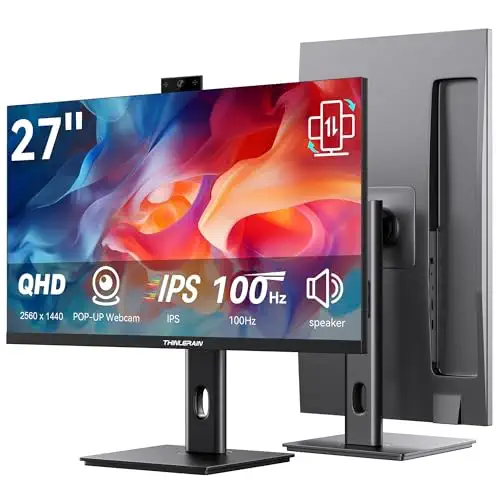


A 27-inch QHD IPS monitor with a pop-up webcam, microphone and speakers, for people who want a sharp screen and an easy setup for calls.
Most recommended by reviewers
Check price at AmazonPrices and availability on Amazon change often.
One catchThe webcam, microphone and speakers only work once the included USB-C cable connects the monitor to your computer.
It pairs a QHD IPS panel with a pop-up camera, a built-in microphone and dual speakers, which covers most of what a video-call monitor needs in one unit. The listing gives 2560 x 1440 resolution, 178 degree viewing angles and 350 nits, so the screen is sharp and stays readable from the side during calls and document work. The 3MP webcam retracts when it is not needed, which the listing describes as a physical privacy shutter.
The camera and audio hardware need the included USB-C cable to link the monitor to your computer, so check that you have a free port. If you want the simplest Full HD setup, the ASUS model below is the alternative.


A 120Hz QHD monitor with the highest-resolution pop-up webcam in this list, for people who want the best picture on their calls.
Prices and availability on Amazon change often.
The CUNPU has the sharpest camera on this list, a 5MP pop-up webcam that the maker says captures 2K video, plus a dual-channel stereo microphone and speaker. The QHD screen runs at 120Hz and lists AMD FreeSync and G-Sync compatibility, which helps if the monitor also serves for gaming or fast scrolling. The 3.5mm audio output lets you add better speakers or a headset later.
The listing does not say whether the panel is IPS, so its viewing angles are not confirmed. The webcam connects over USB-B 2.0, so it works best with a computer that has a free USB port.


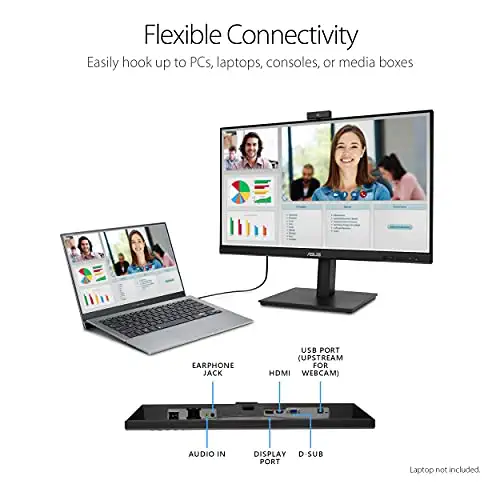

A Full HD IPS monitor with a built-in webcam, mic array and stereo speakers, plus a wide stand for finding the right eye level.
Prices and availability on Amazon change often.
The ASUS BE279QSK puts a Full HD webcam, a mic array and stereo speakers into one frameless 27-inch IPS screen, so the camera is built in rather than added later. The stand offers 35 degrees of tilt up and 5 down, 180 degrees of swivel, 90 degrees of pivot and 150mm of height, which helps you sit at the right eye level for calls. The listing also mentions TÜV Rheinland-certified flicker-free and low blue light features.
The screen is Full HD rather than QHD, and the camera is the lowest resolution of the three main picks. Retail listings group it with video conferencing monitors, which suits the job.
Expert reviews point to three checks. Aim for a webcam of at least 1080p, which is the baseline for clear video. Dedicated external webcams generally produce better image quality than built-in ones, so if camera quality matters most, a separate webcam can beat any monitor here. An IPS panel gives steadier viewing angles during calls.
Built-in speakers remove the need for separate audio, but expert reviews say external speakers or a headset still give better sound quality.
Yes. The six models on this page each have a built-in webcam, microphone and speakers, with screens from Full HD to 4K. Check that the camera connects to your computer over USB, since some need a specific cable.
The Thinlerain 27 inch 2K monitor is our top pick. It has a QHD IPS screen, a pop-up 3MP webcam, a microphone and dual speakers. If you want a higher-resolution camera, the CUNPU lists a 5MP pop-up webcam.
Every pick on this page has built-in speakers, so the choice comes down to sound and screen. Expert reviews say built-in speakers are fine for everyday calls, but external speakers or a headset give better audio quality. The 3.5mm output on the CUNPU lets you connect one.
Dell sells 27-inch video conferencing monitors with webcams and speakers, but none of Dell's models are on this page. Check Dell's own listing for current stock and specs before you buy.
Why trust BullseyeBuy
Each pick is built from its Amazon listing and the camera, microphone, speaker and display features it states. Expert advice on webcam resolution, panel type and audio shaped how we ranked them.
Our expert team tests products when it is needed and researches online and in interviews. Every guide is fact-checked and edited by a real person.
The BullseyeBuy editorial team · Updated Oct 19, 2026
How we pickEditorial standardsAffiliate disclosureReport a mistake
We earn a commission when you buy through our links, at no extra cost to you. It never decides the winner.