BullseyeBuy

The Best Gaming Monitors for 2026

We earn a commission when you buy through our links, at no extra cost to you. How this works.

Shopping for a gaming monitor usually comes down to two things: how smooth fast motion looks, and how sharp the screen is for its size. Refresh rate, response time, panel type and resolution decide both, so those came first.

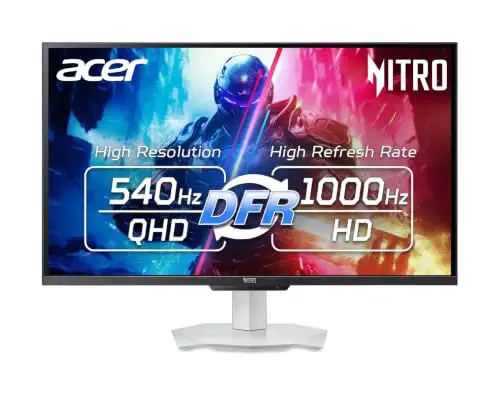
Our top pick is the Acer Nitro XV273U F5, a 27-inch 1440p IPS screen that runs up to 540 Hz. It suits players who want very fast motion without paying for OLED. Here is what's available right now, including a 34-inch curved OLED, a budget 24-inch 240 Hz screen, a larger 32-inch 1440p monitor and a curved budget option.

The rundown

1Acer Nitro XV273U F5 27-inch QHD, monitor gamingAcer Nitro XV273U F5 27-inch QHD 540Hz Gaming Monitor2Alienware AW3423DWF 34-inch Curved QD-OLED Gaming, monitor gamingAlienware AW3423DWF 34-inch Curved QD-OLED Gaming Monitor3Dell SE2426HG 24-inch 240Hz Gaming Monitor, monitor gamingDell SE2426HG 24-inch 240Hz Gaming Monitor4Sceptre 32-inch 2K QHD Prime Gaming, monitor gamingSceptre 32-inch 2K QHD Prime Gaming Monitor5Sceptre 27-inch Curved 240Hz Gaming Monitor, monitor gamingSceptre 27-inch Curved 240Hz Gaming Monitor
Best forBest overallBest curved OLEDBest budgetBest big screenBest curved budget
Size and resolution27-inch, 2560 x 1440 IPS34-inch 21:9, 1800R curve23.8-inch, 1920 x 1080 IPS32-inch, 2560 x 1440 VA27-inch, 1920 x 1080 curved VA
Refresh rate540 Hz (up to 1000 Hz at reduced resolution)165 Hz240 HzUp to 210 Hz240 Hz
Response0.5 ms GTG0.1 ms0.5 ms1 ms BR1 ms BR
SyncAMD FreeSync Premium, NVIDIA G-Sync CompatibleAMD FreeSync Premium ProAMD FreeSync Premium, HDMI VRRNot listedNot listed
Ports2 x HDMI 2.1, 2 x DisplayPortNot listed2 x HDMI, DisplayPort 1.42 x HDMI, DisplayPort, USB Type-C2 x HDMI, DisplayPort
ColorNot listed99.3% DCI-P3, VESA DisplayHDR 40099% sRGB115% sRGB99% sRGB
Check price at AmazonCheck price at AmazonCheck price at AmazonCheck price at AmazonCheck price at Amazon
1Best overall
Acer Nitro XV273U F5 27-inch QHD, monitor gamingAcer Nitro XV273U F5 27-inch QHD, monitor gaming, view 2Acer Nitro XV273U F5 27-inch QHD, monitor gaming, view 3Acer Nitro XV273U F5 27-inch QHD, monitor gaming, view 4Acer Nitro XV273U F5 27-inch QHD, monitor gaming, view 5
1 / 5

Acer Nitro XV273U F5 27-inch QHD 540Hz Gaming Monitor

A fast 1440p IPS for players who want the smoothest LCD motion without OLED pricing.

Size and resolution
27-inch, 2560 x 1440 IPS
Refresh rate
540 Hz (up to 1000 Hz at reduced resolution)
Response
0.5 ms GTG
Sync
AMD FreeSync Premium, NVIDIA G-Sync Compatible
HDR and color
VESA DisplayHDR 600, DCI-P3 95%
Ports
2 x HDMI 2.1, 2 x DisplayPort

Most recommended by reviewers

Check price at Amazon

Prices and availability on Amazon change often.

Why it wins

  • Runs 540 Hz at its native 1440p resolution
  • One expert review measured 14.4 ms input lag at 540 Hz
  • Strong motion blur reduction at high refresh rates
  • Adjustable stand with tilt, swivel, pivot and height

One catchThe 1000 Hz figure only applies at 720p, so at native 1440p you get 540 Hz.

Why it's our top pick

This is the fastest LCD on the shortlist, and the 1440p resolution keeps the image sharp at 27 inches. One expert review measured input lag of 14.4 ms at 540 Hz and called it one of the quickest LCDs tested, which matters in games where reaction time counts.

The listing adds a DCI-P3 95% color gamut, DisplayHDR 600 and two HDMI 2.1 ports, so it also works for a console alongside a PC.

2Best curved OLED
Alienware AW3423DWF 34-inch Curved QD-OLED Gaming, monitor gamingAlienware AW3423DWF 34-inch Curved QD-OLED Gaming, monitor gaming, view 2Alienware AW3423DWF 34-inch Curved QD-OLED Gaming, monitor gaming, view 3Alienware AW3423DWF 34-inch Curved QD-OLED Gaming, monitor gaming, view 4Alienware AW3423DWF 34-inch Curved QD-OLED Gaming, monitor gaming, view 5
1 / 5

Alienware AW3423DWF 34-inch Curved QD-OLED Gaming Monitor

A 34-inch curved OLED for players who want deep blacks and a wide, immersive picture.

Size and shape
34-inch 21:9, 1800R curve
Panel
QD-OLED
Refresh rate
165 Hz
Response
0.1 ms
Color
99.3% DCI-P3, VESA DisplayHDR 400
Sync
AMD FreeSync Premium Pro
Warranty
3 years, including OLED burn-in coverage
Check price at Amazon

Prices and availability on Amazon change often.

Pros

  • QD-OLED panel with true blacks and a wide color gamut
  • Three-year warranty that includes burn-in coverage
  • Creator Mode lets you switch between DCI-P3 and sRGB

Cons

  • At 165 Hz it is slower than the 240 Hz and higher monitors on this list
  • Its price is high compared with the LCD picks
Read our full take

Why we like it

If you want an OLED with a wide, curved picture, this is the most direct fit on the shortlist. The 1800R curve and 34-inch 21:9 format give a lot of screen width, and the QD-OLED panel delivers the deep contrast that LCDs cannot match.

The three-year warranty that covers burn-in is a useful safeguard for a panel type that some buyers still worry about.

3Best budget
Dell SE2426HG 24-inch 240Hz Gaming Monitor, monitor gamingDell SE2426HG 24-inch 240Hz Gaming Monitor, monitor gaming, view 2Dell SE2426HG 24-inch 240Hz Gaming Monitor, monitor gaming, view 3Dell SE2426HG 24-inch 240Hz Gaming Monitor, monitor gaming, view 4Dell SE2426HG 24-inch 240Hz Gaming Monitor, monitor gaming, view 5
1 / 5

Dell SE2426HG 24-inch 240Hz Gaming Monitor

A smooth 240 Hz IPS for players who want high refresh on a tight budget.

Size and resolution
23.8-inch, 1920 x 1080 IPS
Refresh rate
240 Hz
Response
0.5 ms
Sync
AMD FreeSync Premium, HDMI VRR
Color
99% sRGB
Ports
2 x HDMI, DisplayPort 1.4
Eye comfort
TUV Rheinland 3-star certified
Check price at Amazon

Prices and availability on Amazon change often.

Pros

  • 240 Hz refresh with FreeSync Premium
  • IPS panel with wide viewing angles
  • Tilt-adjustable stand

Cons

  • 1080p resolution is less sharp than 1440p at this size
  • Basic feature set, with no HDR emphasis

Why it's our budget pick

This is the cheapest route to a 240 Hz panel on the list. The IPS panel gives wider viewing angles than a budget VA screen, and FreeSync Premium reduces tearing in fast games.

Choose it for competitive shooters and esports-style play, where smooth motion matters more than detail.

4Best big screen
Sceptre 32-inch 2K QHD Prime Gaming, monitor gamingSceptre 32-inch 2K QHD Prime Gaming, monitor gaming, view 2Sceptre 32-inch 2K QHD Prime Gaming, monitor gaming, view 3Sceptre 32-inch 2K QHD Prime Gaming, monitor gaming, view 4Sceptre 32-inch 2K QHD Prime Gaming, monitor gaming, view 5
1 / 5

Sceptre 32-inch 2K QHD Prime Gaming Monitor

A large 1440p screen with a fast refresh rate, for players who want room to see more.

Size and resolution
32-inch, 2560 x 1440 VA
Refresh rate
Up to 210 Hz
Response
1 ms BR
Color
115% sRGB
Ports
2 x HDMI, DisplayPort, USB Type-C
Extras
Built-in speakers, audio out jack
Check price at Amazon

Prices and availability on Amazon change often.

Pros

  • Large 1440p screen at a moderate price
  • USB Type-C input for a single-cable laptop setup
  • Built-in speakers and an audio jack

Cons

  • No expert review covers this model, so its results are listing claims only
  • VA panel, which trades some motion speed for contrast

Why it's on the list

For players who want a bigger screen, this is the 1440p option that keeps the price moderate. The listing lists 210 Hz over USB-C and DisplayPort, and a USB Type-C input can simplify a laptop setup.

No expert review covers this model, so its performance is based on the listing alone.

5Best curved budget
Sceptre 27-inch Curved 240Hz Gaming Monitor, monitor gamingSceptre 27-inch Curved 240Hz Gaming Monitor, monitor gaming, view 2Sceptre 27-inch Curved 240Hz Gaming Monitor, monitor gaming, view 3Sceptre 27-inch Curved 240Hz Gaming Monitor, monitor gaming, view 4Sceptre 27-inch Curved 240Hz Gaming Monitor, monitor gaming, view 5
1 / 5

Sceptre 27-inch Curved 240Hz Gaming Monitor
A curved 27-inch 240 Hz screen for players who want immersion without a high price.

Size and resolution
27-inch, 1920 x 1080 curved VA
Curve
1500R
Refresh rate
240 Hz
Response
1 ms BR
Color
99% sRGB
Ports
2 x HDMI, DisplayPort
Extras
Built-in speakers
Check price at Amazon

Prices and availability on Amazon change often.

Pros

  • Curved screen at a low price
  • 240 Hz refresh rate
  • Built-in speakers for a clutter-free desk

Cons

  • 1080p resolution on a 27-inch screen is less sharp than 1440p
  • No expert review covers this model, so results are listing claims only

Why it's on the list

This is the lowest-cost curved 240 Hz option on the shortlist. The 1500R curve suits a close, wide-field view, and the 240 Hz rate keeps fast motion smooth.

Its 1080p resolution is the trade-off, so it suits players who value speed and immersion over sharpness.

FAQ

Which monitor suits you?
  • Competitive shooters: the Acer Nitro XV273U F5 for the fastest LCD motion, or the Dell SE2426HG if budget matters more.
  • Immersive play and movies: the Alienware AW3423DWF for OLED depth and a wide curve.
  • Bigger desks and more screen: the Sceptre 32-inch for 1440p width.
What to look for?

Refresh rate decides how smooth motion looks, and 240 Hz and up is the range most FPS players aim for. Response time matters for blur, and panel type decides contrast and color. Resolution changes how sharp the picture is at a given size, so pair the screen with a graphics card that can drive it smoothly.

What should you skip?

Skip a 1080p monitor if you have a larger screen and want detail. Skip OLED if you cannot accept some burn-in risk and do not want a warranty that covers it. Check that your games support ultrawide screen space before buying a 34-inch model.

What is the best 1440p gaming monitor in 2026?

The Acer Nitro XV273U F5 is our pick for 1440p. It is a 27-inch IPS panel that runs up to 540 Hz at 1440p, and one expert review measured 14.4 ms input lag at that rate. If you want 1440p at a lower price, the Sceptre 32-inch model is also 1440p, at 210 Hz.

What is the best 4K gaming monitor in 2026?

The ASUS ROG Strix OLED XG32UCWMG is the 4K option in this shortlist. Its dual mode gives 4K up to 240 Hz, or 1080p at 480 Hz. A manufacturer guide suggests a 27 to 32-inch screen for 4K, and says the graphics card must be powerful enough for smooth 4K gameplay.

What is the best budget gaming monitor in 2026?

The Dell SE2426HG is the budget pick here. It is a 23.8-inch IPS panel with a 240 Hz refresh rate, 0.5 ms response and FreeSync Premium. Check the live price on the listing before buying, since prices change.

Is 240Hz overkill for gaming?

For most players, 240 Hz is a practical target. A manufacturer guide recommends 240 Hz and up for FPS players, while one expert review advises asking whether you really need extremely high refresh rates. Beyond 240 Hz the gains are smaller, so decide based on the games you play.

Why trust BullseyeBuy

How we made this guide

  • 10 monitors compared
  • 4 expert reviews read
  • 5 picks shown

Every monitor here has a current Amazon listing, and availability is rechecked before each update. Picks were weighed on refresh rate, response time, panel type, resolution and what the expert reviews say about each model.

Our expert team tests products when it is needed and researches online and in interviews. Every guide is fact-checked and edited by a real person.

The BullseyeBuy editorial team · Updated Oct 17, 2026

Checking our work: 5 sources

We earn a commission when you buy through our links, at no extra cost to you. It never decides the winner.