BullseyeBuy

The Best OLED Monitors for Your Xbox Series X

We earn a commission when you buy through our links, at no extra cost to you. How this works.

If you play on an Xbox Series X and want the deep blacks and bright colors of OLED, a monitor is the right place to start. You will want HDMI 2.1 support, a 4K or 1440p panel that suits a console capped at 120Hz, and a burn-in warranty you can count on.

Our top pick is the Samsung Odyssey OLED G6 27-inch QD-OLED. It has strong color and a fast panel, and it gives you OLED quality at a sensible price. Two other options cover a premium large-screen choice and a lower-cost OLED route.

The rundown

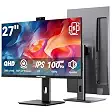
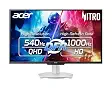
1Samsung Odyssey OLED G6 27-inch QD-OLED, best oled monitor for xbox series xSamsung Odyssey OLED G6 27-inch QD-OLED2LG 27GX704A-B 27-inch QHD OLED, best oled monitor for xbox series xLG 27GX704A-B 27-inch QHD OLED3ASUS ROG Strix XG27ACDNG 26.5-inch QD-OLED, best oled monitor for xbox series xASUS ROG Strix XG27ACDNG 26.5-inch QD-OLED
Best forBest overallBest for a bright, glossy OLEDBest budget OLED
Panel27-inch QD-OLED, QHD27-inch OLED, QHD (2560x1440)26.5-inch QD-OLED, QHD
Refresh rate360Hz240Hz360Hz
Response time0.03ms GtG0.03ms GtG0.03ms
Warranty3 yearsNot listed3 years with burn-in coverage
Check price at AmazonCheck price at AmazonCheck price at Amazon
1Best overall
Samsung Odyssey OLED G6 27-inch QD-OLED, best oled monitor for xbox series xSamsung Odyssey OLED G6 27-inch QD-OLED, best oled monitor for xbox series x, view 2Samsung Odyssey OLED G6 27-inch QD-OLED, best oled monitor for xbox series x, view 3Samsung Odyssey OLED G6 27-inch QD-OLED, best oled monitor for xbox series x, view 4Samsung Odyssey OLED G6 27-inch QD-OLED, best oled monitor for xbox series x, view 5
1 / 5

Samsung Odyssey OLED G6 27-inch QD-OLED

A 27-inch QD-OLED with HDMI 2.1 and strong color, a good all-round OLED for Xbox.

Panel
27-inch QD-OLED, QHD
Refresh rate
360Hz
Response time
0.03ms GtG
Adaptive sync
AMD FreeSync Premium Pro
Warranty
3 years

Most recommended by reviewers

Check price at Amazon

Prices and availability on Amazon change often.

Why it wins

  • HDMI 2.1 supported for 4K 120Hz console play
  • Burn-in protection with a dynamic cooling system and logo detection
  • 3-year warranty

One catchAt 360Hz it is far faster than an Xbox Series X can use, so you pay for headroom you will not touch.

Why the Samsung Odyssey OLED won

For an Xbox Series X, the Samsung Odyssey OLED G6 is the only pick here that pairs a QD-OLED panel with HDMI 2.1 and a 3-year warranty, making it the strongest all-round choice for this search.

  1. HDMI 2.1 for 4K 120Hz console play. the maker says the Samsung supports HDMI 2.1 for 4K 120Hz console play, and the LG 27GX704A-B also has HDMI 2.1, so this point is shared with that pick. The ASUS ROG Strix XG27ACDNG is listed with DisplayPort-style G-SYNC sync and no HDMI 2.1 is mentioned in its listing features, so it is not a clear match for Xbox output.
  2. QD-OLED panel with 0.03ms response. The Samsung uses a 27-inch QD-OLED panel with a 0.03ms GtG response time, the same response figure as the LG and ASUS picks. Its panel is the same QD-OLED type as the ASUS, but the Samsung is the larger 27-inch screen compared with the ASUS 26.5-inch.
  3. Burn-in protection and a 3-year warranty. The Samsung adds a pulsating heat pipe cooling system, logo and taskbar detection, and a 3-year warranty, which the listing presents as burn-in protection. The ASUS also offers 3 years with burn-in coverage, so the Samsung matches it on warranty length but does not have a clear coverage advantage over it.
  4. Smooth VRR with FreeSync Premium Pro. The Samsung supports AMD FreeSync Premium Pro variable refresh rate, which the maker says keeps the panel synced to remove tearing and lag. The ASUS uses G-SYNC Compatible and the LG's sync support is not listed in the provided features, so the Samsung's sync support is clearly stated for this use.

Why not the others

  • LG 27GX704A-B 27-inch QHD OLED: The LG is cheaper and brighter with a 1300-nit peak and a glossy finish, so choose it if you want a bright room-friendly OLED, but its QHD resolution and glossy finish are weaker for a 4K Xbox image.
  • ASUS ROG Strix XG27ACDNG 26.5-inch QD-OLED: The ASUS is the budget QD-OLED option with a 3-year burn-in warranty, so choose it if price matters most, but its 26.5-inch screen is smaller and its listing does not mention HDMI 2.1 for console use.

Bottom line: Buy the Samsung Odyssey OLED G6 if you want a QD-OLED monitor with HDMI 2.1 and a 3-year warranty for an Xbox Series X, and look at the LG if you want a brighter, cheaper glossy OLED or the ASUS if you want the lowest price on a QD-OLED panel.

2Best for a bright, glossy OLED
LG 27GX704A-B 27-inch QHD OLED, best oled monitor for xbox series xLG 27GX704A-B 27-inch QHD OLED, best oled monitor for xbox series x, view 2LG 27GX704A-B 27-inch QHD OLED, best oled monitor for xbox series x, view 3LG 27GX704A-B 27-inch QHD OLED, best oled monitor for xbox series x, view 4LG 27GX704A-B 27-inch QHD OLED, best oled monitor for xbox series x, view 5
1 / 5

LG 27GX704A-B 27-inch QHD OLED

A glossy 27-inch QHD OLED with HDMI 2.1 and a bright 1300-nit peak.

Panel
27-inch OLED, QHD (2560x1440)
Refresh rate
240Hz
Response time
0.03ms GtG
Peak brightness
1300 nits
Ports
HDMI 2.1, DisplayPort
Check price at Amazon

Prices and availability on Amazon change often.

Pros

  • HDMI 2.1 for console compatibility
  • Bright glossy finish with 1300-nit peak
  • Lower price than the premium OLED tier

Cons

  • QHD rather than 4K, so less sharp on a 4K console image
  • Glossy finish reflects light in bright rooms

Why we like it

For a 1440p-class OLED with HDMI 2.1, the LG 27GX704A-B is a solid pick. Its 240Hz panel and 1300-nit peak brightness make HDR scenes stand out, and the glossy coating suits rooms with controlled light.

3Best budget OLED
ASUS ROG Strix XG27ACDNG 26.5-inch QD-OLED, best oled monitor for xbox series xASUS ROG Strix XG27ACDNG 26.5-inch QD-OLED, best oled monitor for xbox series x, view 2ASUS ROG Strix XG27ACDNG 26.5-inch QD-OLED, best oled monitor for xbox series x, view 3ASUS ROG Strix XG27ACDNG 26.5-inch QD-OLED, best oled monitor for xbox series x, view 4ASUS ROG Strix XG27ACDNG 26.5-inch QD-OLED, best oled monitor for xbox series x, view 5
1 / 5

ASUS ROG Strix XG27ACDNG 26.5-inch QD-OLED

A 1440p QD-OLED with burn-in care features and a 3-year warranty at a lower price.

Panel
26.5-inch QD-OLED, QHD
Refresh rate
360Hz
Response time
0.03ms
Warranty
3 years with burn-in coverage
Sync
G-SYNC Compatible
Check price at Amazon

Prices and availability on Amazon change often.

Pros

  • QD-OLED picture quality at a lower price
  • OLED Care+ features reduce burn-in risk
  • 3-year warranty including burn-in

Cons

  • Refresh rate far beyond what the console can output
  • Smaller 26.5-inch screen

Why it's our budget pick

If you want OLED without the premium price, the ROG Strix XG27ACDNG offers QD-OLED color, OLED Care+ burn-in protection, and a 3-year warranty that covers burn-in. It is a sensible pick for a 1440p console setup.

FAQ

Who it's for?

Choose a 1440p OLED if you want the picture quality of OLED without paying for resolution the console rarely reaches. Choose a 4K OLED only if your Xbox output and budget both support it.

What to look for?
  • HDMI 2.1 so you can run 4K 120Hz with VRR
  • A burn-in warranty that covers OLED
  • Refresh rates above 120Hz are not needed for the console
Who should skip OLED?

If you use the monitor heavily for static desktop work, burn-in risk is higher. A TV or non-OLED monitor may suit you better.

Does an OLED monitor work with an Xbox Series X?

Yes, provided the monitor has HDMI 2.1, which lets it carry 4K 120Hz with VRR from the console. Check the port before buying.

Is an OLED monitor good for the Xbox Series X?

It can be. OLED gives deep blacks and strong HDR highlights, which suit console play well, as long as you accept the burn-in trade-off.

Why don't pro gamers use OLED?

Some players avoid OLED because of burn-in risk with static images such as HUDs and taskbars. Newer protection features reduce this, but do not remove it.

Is 4K or 1440p better for Xbox Series X?

A 1440p monitor is often a practical choice, since the console frequently outputs 1440p and a 4K monitor costs more for a smaller gain.

What monitor should I buy for my Xbox Series X?

Pick a monitor with HDMI 2.1, an OLED panel if you want the best picture, and a warranty that covers burn-in.

What is the best 4K OLED monitor for the Xbox Series X?

Our fitting shortlist has no 4K OLED in stock right now, so the top 1440p picks are the best options for this build.

Why trust BullseyeBuy

How we made this guide

  • 5 fitting in-stock monitors compared
  • 6 expert and community sources checked
  • 2026 pricing and availability as of this build

This shortlist is built from listing specs, Amazon availability, and recommendations from editorial reviews and reader discussions. Each pick was weighed on resolution, refresh rate, HDMI 2.1 support, and OLED burn-in protection.

Our expert team tests products when it is needed and researches online and in interviews. Every guide is fact-checked and edited by a real person.

The BullseyeBuy editorial team · Updated Oct 19, 2026

Checking our work: 5 sources

We earn a commission when you buy through our links, at no extra cost to you. It never decides the winner.