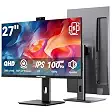
Wixzet 15.6 inch laptop screen extender (4-in-1 modes)Best overall
- Screen
- 15.6 inch FHD 1080P IPS
- Brightness
- 280 nits
- Color
- 100% sRGB
- Weight
- 2.75 lbs
Most recommended by reviewers
Check price at AmazonWe earn a commission when you buy through our links, at no extra cost to you. How this works.
A second screen can make a laptop feel like a full desk setup. It helps when you need more room for emails, spreadsheets or video calls. Before you buy, check the screen size, the weight, whether your laptop has a full-featured USB-C port, and how bright the panel is for the room where you work.
Our top pick is the Wixzet 15.6 inch model. It gives you the most working space and can pass charging power through to your laptop. It suits people who work at a desk most days. Here is what's available right now, including a lighter 14 inch screen for travel, a budget option, a model that shares easily, and a larger dual setup.
1 Wixzet 15.6 inch laptop screen extender (4-in-1 modes) | 2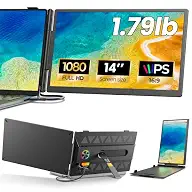 Anyking A6 14 inch laptop screen extender | 3 Orfibz 14.2 inch laptop screen extender | 4 KEFEYA 14 inch laptop screen extender | 5 APILDELLA 14 inch dual laptop screen extender | 6 Xenotik 16 inch laptop screen extender | |
|---|---|---|---|---|---|---|
| Best for | Best overall | Best budget pick | Best for travel | For sharing and mirroring | Best for 13 to 16 inch laptops | Best for a bigger screen |
| Screen | 15.6 inch FHD 1080P IPS | 14 inch FHD 1920 x 1080 IPS | 14.2 inch FHD 1080P IPS | 14 inch FHD 1920 x 1080 IPS | 14 inch FHD 1920 x 1080 IPS | 16 inch 1920 x 1200 IPS, 16:10 |
| Brightness | 280 nits | 300 nits | 300 nits | 300 nits | Not listed | 350 nits |
| Color | 100% sRGB | 100% sRGB | Not listed | 72% NTSC | Not listed | Not listed |
| Weight | 2.75 lbs | 1.79 lbs | 1.87 lbs | Not listed | Not listed | Not listed |
| Fits laptops | 13 to 17.3 inch | Not listed | Not listed | 13 to 17 inch | 13 to 16 inch | 12 to 17.3 inch |
| Warranty | 12 months | 1 year | 1 year, 30-day free returns | Not listed | 1-year replacement | Not listed |
| Check price at Amazon | Check price at Amazon | Check price at Amazon | Check price at Amazon | Check price at Amazon | Check price at Amazon |
Wixzet 15.6 inch laptop screen extender (4-in-1 modes)Best overallMost recommended by reviewers
Check price at Amazon Anyking A6 14 inch laptop screen extenderBest budget pick
 Orfibz 14.2 inch laptop screen extenderBest for travel
 KEFEYA 14 inch laptop screen extenderFor sharing and mirroring
 APILDELLA 14 inch dual laptop screen extenderBest for 13 to 16 inch laptops
 Xenotik 16 inch laptop screen extenderBest for a bigger screen


The biggest screen in this list, with power passed through to your laptop.
Most recommended by reviewers
Check price at AmazonPrices and availability on Amazon change often.
One catchAt 2.75 lbs it is the heaviest model here, so it is less comfortable to carry all day.
This is the model to choose if you want the most working space from one extra screen. The 15.6 inch IPS panel is larger than the 14 inch screens in this list, and the listing gives 280 nits of brightness and 100% sRGB color coverage for clear text and everyday media. The stand has two height slots and rotates 192 degrees, so you can set the screen level with your laptop.
The USB-C port can also pass up to 100W of power from a compatible charger to your laptop while the screen is in use, which helps on long desk days. Setup needs no driver, and the 12-month warranty covers it for a year. The trade-off is weight: at 2.75 lbs it suits a desk more than a daily commute.
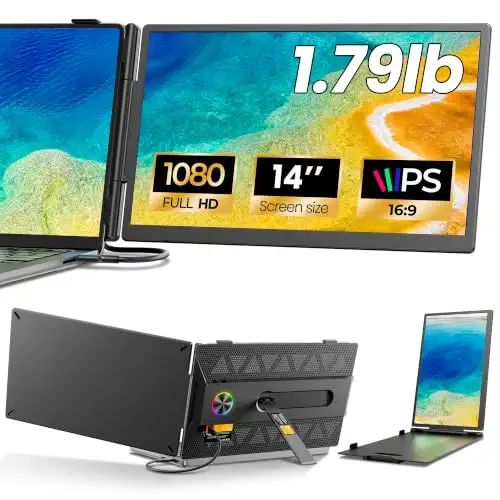


A light 14 inch screen with a warranty and a simple two-cable option.
Prices and availability on Amazon change often.
This is the value pick for people who want a light 14 inch screen without paying for extras. At 1.79 lbs and 0.3 inch at its thinnest point, it slips into a laptop bag easily. The screen turns 180 degrees and the stand tilts 90 degrees, so you can set it for a document, a video call or a spreadsheet.
Check your laptop before you buy. The one-cable setup needs a USB-C port with DisplayPort Alt Mode. Otherwise, the HDMI and USB-A route works, but it needs a power adapter that is not in the box. The listing includes a 1-year warranty.


A very light screen with a wide adjustable angle and free returns.
Prices and availability on Amazon change often.
This is the pick for frequent travelers who want a second screen that stays easy to carry. It weighs 1.87 lbs and is 0.27 inch thin, so it adds little bulk to a backpack. The 226 degree adjustable angle lets you set the screen for a desk, a train table or a coffee shop bench.
the maker says it works with 14 to 17.3 inch laptops and includes the cables for both connection methods. It has a 1-year warranty and 30-day free returns, which helps if it does not suit your setup.


Mirror, extend and portrait modes, plus a 180 degree turn for sharing.
Prices and availability on Amazon change often.
This is a good choice when you show your screen to other people. The 180 degree rotation and mirror mode make it easy to share a document or a slide with a colleague or client. The listing includes all the cables for both USB-C and HDMI setups.
Its color coverage is 72% NTSC, which is lower than the 100% sRGB panels above it, so pick it for text and documents rather than photo editing. The HDMI route needs an extra cable for power.


A sliding arm and a 225 degree fold for smaller laptops.
Prices and availability on Amazon change often.
This model suits people with 13 to 16 inch laptops who want a neat, fold-away screen. The sliding support arm adjusts to fit the laptop, and the screen folds from 0 to 225 degrees. The listing includes USB-C and HDMI cables and a 1-year replacement policy.
If the screen shows no signal or looks dim, the setup note recommends connecting the HDMI to USB-C cable and adding power through the first USB-C port.


Two 16 inch screens at 16:10 for a larger workspace with only two cables.
Prices and availability on Amazon change often.
This is the choice for people who want the most screen space. Each screen is 16 inches with a 16:10 shape, which shows more rows of text, code or spreadsheet cells than a standard 1080P panel. The listing gives 350 nits of brightness and describes a matte aluminum finish.
Setup needs two cables and no driver, but your laptop must have two full-featured USB-C ports. Plan for the extra desk space that two 16 inch screens take up.
Check the port your laptop uses for video. A USB-C port with DisplayPort Alt Mode can run the screen on one cable. If your laptop has no such port, the HDMI and USB-A route works but needs a second cable for power.
Check operating system support, especially on macOS. One expert review notes that some extenders rely on display software rather than a plain USB-C video signal.
Plan for battery use. One expert review notes that extenders draw power from the laptop battery, so a small power bank helps when you work away from an outlet.
Skip a screen if your laptop has no full-featured USB-C port and no HDMI output, because you will not be able to connect it. Skip it if you need a touch screen, since none of the listed models include one.
For bright outdoor work, pick a panel rated above 250 nits. One expert review notes that dimmer panels look washed out on a sunny patio. Every model here is rated at or above 280 nits, but the most outdoor-ready is the 330 cd/m2 Anyking 15.6 inch backup.
A 15.6 inch FHD model with USB-C power pass-through is a good all-round choice. The Wixzet 15.6 inch model is our top pick because it has the most screen space and charges your laptop through the same port. Confirm your laptop has a full-featured USB-C port first.
If you want a larger workspace, the Xenotik 16 inch setup gives you two 16 inch screens at 16:10. It needs only two USB-C cables and no driver, but your laptop must have two full-featured USB-C ports. Choose a single extender if your laptop has only one such port.
The Anyking A6 and the Orfibz models are the lightest options, at 1.79 lbs and 1.87 lbs. Both are slim enough for a laptop bag. Check that your laptop supports the cable setup before you travel with it.
For daily desk work, the 15.6 inch Wixzet top pick is the strongest fit, with 280 nits, 100% sRGB color and power pass-through. Confirm that your operating system is supported before you buy, since some extenders need display software.
Why trust BullseyeBuy
The shortlist is built from ten Amazon listings checked for stock and laptop size fit, then narrowed on screen size, weight, ports and warranty. Expert reviews were used for buying checks on power, software support and screen brightness.
Our expert team tests products when it is needed and researches online and in interviews. Every guide is fact-checked and edited by a real person.
The BullseyeBuy editorial team · Updated Oct 17, 2026
How we pickEditorial standardsAffiliate disclosureReport a mistake
We earn a commission when you buy through our links, at no extra cost to you. It never decides the winner.