Skylight Calendar 2 (15-inch)Best overall
- Screen
- 15-inch Full HD touchscreen
- Storage
- 16GB
- Memory
- 4GB RAM
- Mounting
- Wall mount and 180 degree stand included
Most recommended by reviewers
Check price at AmazonWe earn a commission when you buy through our links, at no extra cost to you. How this works.
A wall calendar only helps if everyone can see it and it stays in sync with the calendars you already use. This guide is for families who want one shared place for school runs, appointments and weekend plans. Here is what's available right now, with models that sync with Google, Apple, Outlook or Cozi and screens big enough to read from across the kitchen.
Our top pick is the Skylight Calendar 2 (15-inch). It comes with a wall mount and stand, and it's a favorite among owners who want a polished display. Its extras, including meal planning and rewards, need a paid plan, so it suits families willing to pay for them. The other picks cover no-subscription options at 10.1, 15.6 and 21.5 inches.
1 Skylight Calendar 2 (15-inch) | 2 Yemsd 21.5-inch Digital Calendar | 3 Westsee 15.6-inch Digital Calendar | 4 LOVCUBE 10.1-inch Digital Calendar | 5 Oqsonwu 10.1-inch Digital Calendar | 6 Nexrary 15.6-inch Digital Calendar | |
|---|---|---|---|---|---|---|
| Best for | Best overall | Best big screen | Best 15.6-inch, no subscription | Best small size with a warranty | Best value, no subscription | Best for meals and chores |
| Screen | 15-inch Full HD touchscreen | 21.5-inch HD touchscreen | 15.6-inch touchscreen | 10.1-inch HD touchscreen | 10.1-inch touchscreen | 15.6-inch HD touchscreen |
| Storage | 16GB | 32GB, expandable | 32GB built-in | Not listed | Not listed | Not listed |
| Mounting | Wall mount and 180 degree stand included | Wall or base | Table stand and wall-mount kit | Not listed | Wall-mountable | Wall or desktop |
| Sync | Not listed | Google, Outlook and iCloud | Google, iCloud and Outlook | Google, iCloud, Outlook, Cozi and Yahoo | Google, iCloud and Outlook | Google, iCloud, Outlook, Cozi and Yahoo |
| Features | Not listed | Chores and rewards, to-do lists, photo frame | Not listed | Chore chart with rewards, weekly meals, shared grocery lists | Chore list with stars, weekly meal manager, recipe upload, grocery list, to-do list, photo slideshow | Chore chart with stars, weekly meal plans, custom checklists, photo slideshow |
| Subscription | Not listed | No monthly subscription required, per listing | Core functions free; advanced AI tools may need a subscription later | No subscription fees, per listing | No subscription, per listing | No monthly subscription required, per listing |
| Check price at Amazon | Check price at Amazon | Check price at Amazon | Check price at Amazon | Check price at Amazon | Check price at Amazon |
Skylight Calendar 2 (15-inch)Best overallMost recommended by reviewers
Check price at Amazon Yemsd 21.5-inch Digital CalendarBest big screen
 Westsee 15.6-inch Digital CalendarBest 15.6-inch, no subscription
 LOVCUBE 10.1-inch Digital CalendarBest small size with a warranty
 Oqsonwu 10.1-inch Digital CalendarBest value, no subscription
 Nexrary 15.6-inch Digital CalendarBest for meals and chores


A 15-inch touchscreen calendar and chore board for families who want a complete setup and are willing to pay for the extras.
Most recommended by reviewers
Check price at AmazonPrices and availability on Amazon change often.
One catchMeal planning, rewards and the photo screensaver need the paid Plus plan.
One expert review calls the Skylight Calendar 2 a favorite, mainly for its photo screensaver, and notes it is the newest model in the line, with better performance and swappable Snap Frames. The reviewer found the software easy to use and said it imported a Google Calendar and shared calendars quickly.
The package is complete: a 15-inch Full HD screen, a wall mount and an adjustable stand in the box. The trade-off is cost. Several features most families want sit behind the Plus plan, so budget for it before you buy.


A 21.5-inch touchscreen for households that want the whole week on one large screen, with no subscription fees listed.
Prices and availability on Amazon change often.
If the whole week needs to be visible at once, the 21.5-inch screen is the one on this list built for that job. The listing covers schedules, chores, meal plans, lists and a photo frame, and says syncing works with Google, Outlook and iCloud without a monthly subscription.
One expert review favors the larger size for a full family command center, provided the wall has room. Photo sharing from the free app helps families who are apart.


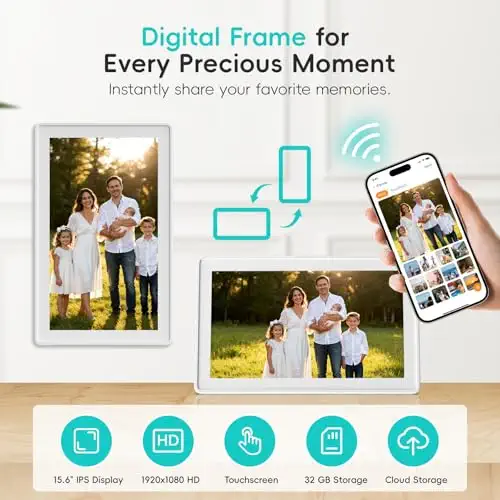


A 15.6-inch calendar for families who want core features free and plenty of room for photos.
Prices and availability on Amazon change often.
Westsee's listing puts its core features in the free column: schedules, tasks and rewards, meal plans, photo display and a grocery list. That matters if you want to avoid a monthly bill.
It sits in the middle of the size range, with a 15.6-inch screen, 32GB storage, and both a stand and a wall kit in the box. The caveat is in the listing itself: advanced AI tools may need a subscription later.


A small 10.1-inch calendar for desks and kitchen corners that says it has no subscription and comes with a 2-year warranty.
Prices and availability on Amazon change often.
LOVCUBE has the smallest screen on this list, and its listing names the widest set of sync options: Google, iCloud, Outlook, Cozi and Yahoo. It says all features come without subscription fees and includes a 2-year warranty.
Its size suits a desk or small kitchen corner. Choose a larger model if the whole family needs to read it from across a room.


A budget 10.1-inch wall planner with chores, meals and a photo frame, and no subscription.
Prices and availability on Amazon change often.
Oqsonwu is the most affordable calendar here that says it has no subscription. It covers what most families ask for: a shared week view, chore stars, a meal manager that turns recipes into grocery lists, and a photo slideshow.
The listing gives fewer hardware details than the larger models, so check screen and storage before buying.


A 15.6-inch planner with a chore chart and weekly meals, sold with no monthly subscription required.
Prices and availability on Amazon change often.
Nexrary's listing is built around the daily routine: a chore chart where kids check off tasks and earn stars, weekly meal plans, and custom checklists for travel or shopping. Like the others here, it says all features come with no monthly subscription.
The screen is listed as HD rather than Full HD, so it suits a planner more than a showcase display.
Start with sync. Check that your calendar is Google, Apple, Outlook, Cozi or Yahoo, and that the listing names it. Then pick a screen size by wall space: 15.6 inches for a tighter wall, 21.5 inches for a full command center view.
Read the feature list for the words 'subscription' and 'paid'. Calendars that keep meal planning, rewards or photo screensaver behind a monthly fee cost more over time than the sticker price suggests.
Our top pick is the Skylight Calendar 2, which one expert review calls a favorite. For a no-subscription option, the Yemsd 21.5-inch and Westsee 15.6-inch list their core features as free. Choose a screen size first, then check which features you need and whether they cost extra.
It depends on what you need. Skylight has the strongest expert backing on this list, but its most useful extras sit behind a paid plan. If you want no subscription, the Westsee 15.6-inch and Yemsd 21.5-inch are the closest alternatives here.
This shortlist does not include Cozi as a product, so we can't compare the two directly. Cozi is named as a sync option on the LOVCUBE and Nexrary calendars. The Skylight listing does not name Cozi, so check before buying if Cozi is your family planner.
They can be, if they replace paper and sync with the calendars you already use. One expert review notes they are a considerable investment for mainly one job, and that placement matters most: a calendar where the family gathers gets used every day.
A 15.6-inch screen suits a tighter wall. A 21.5-inch screen gives a full command center view but needs more space. The 10.1-inch models suit a desk or a small kitchen corner.
Not for every model. The Yemsd, Westsee, LOVCUBE, Oqsonwu and Nexrary listings say core features are free. Skylight and the Dragon Touch models keep some features behind paid plans, so check the feature list before you buy.
Why trust BullseyeBuy
We compared 10 listings on calendar sync, screen size, what ships in the box and which features need a subscription. Expert reviews were used to check which features are paywalled and how placement affects daily use.
Our expert team tests products when it is needed and researches online and in interviews. Every guide is fact-checked and edited by a real person.
The BullseyeBuy editorial team · Updated Oct 17, 2026
How we pickEditorial standardsAffiliate disclosureReport a mistake
We earn a commission when you buy through our links, at no extra cost to you. It never decides the winner.