ELEGOO Mars 5 UltraBest overall
- Screen
- 7-inch 9K mono LCD (8520 x 4320)
- XY resolution
- 18 x 18 µm
- Build size
- 6.04 x 3.06 x 6.49 in
- Speed
- Up to 150 mm/h with tilt release
Most recommended by reviewers
Check price at AmazonWe earn a commission when you buy through our links, at no extra cost to you. How this works.
If you paint tabletop figures, you want a hero, a villain or a whole warband with sharp faces and clean armor. A resin printer makes that kind of fine detail possible at home. For miniatures, the pixel size on the screen matters more than the big "K" number on the box, so that is where we looked first. We also weighed setup effort, upkeep and whether each printer is in stock on Amazon.
Our top pick is the ELEGOO Mars 5 Ultra. It suits most hobbyists, with 18 µm detail, auto leveling and a camera on a compact plate that is plenty for character minis. The ELEGOO Saturn 4 Ultra 16K suits bigger batches and cold workshops, and the ANYCUBIC Photon Mono 4 keeps costs down without giving up fine detail.
1 ELEGOO Mars 5 Ultra | 2 ELEGOO Saturn 4 Ultra 16K | 3 ANYCUBIC Photon Mono 4 | |
|---|---|---|---|
| Best for | Best overall | Best for batches and cold workshops | Best budget pick |
| Screen | 7-inch 9K mono LCD (8520 x 4320) | 10-inch 16K mono LCD | 7-inch 10K mono LCD (9024 x 5120) |
| XY resolution | 18 x 18 µm | 14 x 19 µm | 17 x 17 µm |
| Build size | 6.04 x 3.06 x 6.49 in | 8.33 x 4.66 x 8.66 in | 6.04 x 3.42 x 6.49 in |
| Speed | Up to 150 mm/h with tilt release | Up to 150 mm/h with tilt release | Up to 70 mm/h |
| Extras | AI camera, auto leveling, Wi-Fi transfer | Heated resin tank, AI camera, auto leveling | Not listed |
| Check price at Amazon | Check price at Amazon | Check price at Amazon |
ELEGOO Mars 5 UltraBest overallMost recommended by reviewers
Check price at Amazon ELEGOO Saturn 4 Ultra 16KBest for batches and cold workshops
 ANYCUBIC Photon Mono 4Best budget pick
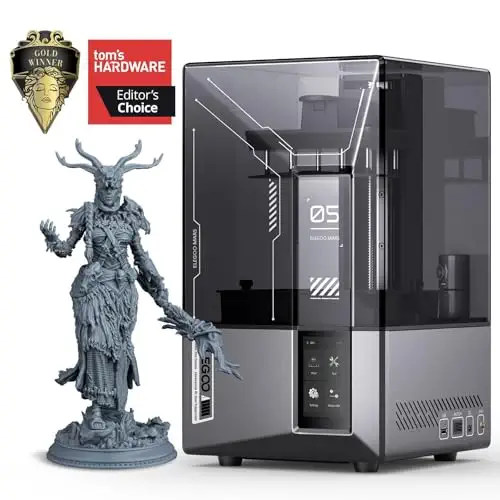


Best for hobbyists printing character minis who want fine detail with little setup fuss.
Most recommended by reviewers
Check price at AmazonPrices and availability on Amazon change often.
One catchPrints can stick hard to the build plate, so lift them off slowly.
If you mostly print single character minis and want crisp faces without fuss, this is the one to get. Its 18 µm pixel size sits in the 18 to 24 µm range one reviewer calls the sweet spot for miniature work, and another called it perfect for miniatures and tabletop models. Tilt release gets it to 150 mm/h without special resin or release films.
Auto leveling, a one-button self-check, a sensor that flags low resin and foreign objects, and a camera for time-lapse make setup easier. The plate is compact, so it is not the choice for terrain. The one thing to plan for is that prints can grip the plate hard, so take your time lifting them off.


Best for players who print whole squads at once or work in an unheated garage.
Prices and availability on Amazon change often.
Choose this if you print batches of minis or want room for larger parts like buildings and vehicles. The 10-inch 16K screen gives a 14 x 19 µm pixel size on a plate bigger than the Mars 5 Ultra's. A reviewer noted it needs no special resin or expensive release film, and the tilting vat peels layers off gently.
The tank heats the resin when it drops below 25°C. A reviewer saw it hold that temperature in freezing conditions, which helps in an unheated garage. Expect a few small annoyances with the camera software, and remember a large plate wastes more resin on a failed print.




Prices and availability on Amazon change often.
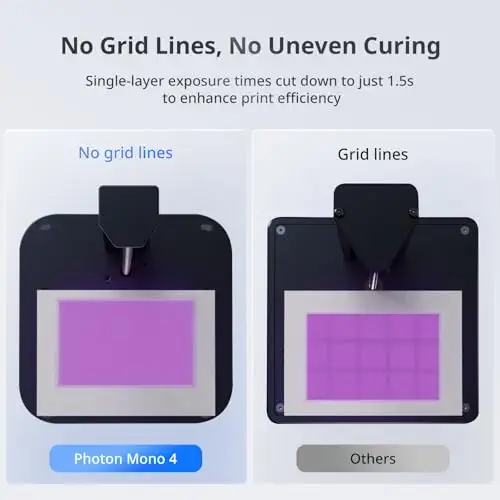
The 7-inch 10K screen gives 17 µm pixels, finer than the 18 to 24 µm range one reviewer calls the sweet spot for miniatures. The 6.04 x 3.42 x 6.49 inch plate suits character minis.
You level it once with four screws and then leave it, and it resumes after a power cut. The trade-offs are speed, at up to 70 mm/h, and a bare feature list: no camera or Wi-Fi on the listing, and Anycubic's app is not supported.
Resin printing needs gloves, a mask and a well-ventilated space, and every print needs washing and curing afterwards. Ventilation is the most overlooked part for first-time owners. If you are a beginner or have young kids at home, one reviewer suggests a filament printer may suit you better. If you add wash and cure machines, leave extra workshop space.
Standard resin made for LCD printers is the usual choice, and the printers here do not lock you into one brand. A reviewer noted the Saturn 4 Ultra needs no special resin, and the Halot Mage S takes any standard resin. One reviewer's Mars 5 Ultra prints came out smooth and clean with both Elegoo's rapid standard resin and Prusa's model resin. Some professional machines, like the Formlabs Form 4, require approved materials.
For fine detail, yes. Reviewers describe resin as well suited to miniatures because it captures small features such as faces and textures. The cost is more post-processing and safety steps: gloves, a mask, ventilation, washing and curing. One reviewer suggests beginners or homes with young kids consider a filament printer instead.
The Photon Mono 4 is our budget pick because its 17 µm pixels are finer than the range reviewers favor for minis. The Mars 5 is another low-cost option with auto leveling, but its 35 µm pixels are coarser. Budget resin printers are common and sales can push prices lower, so compare the Amazon price shown with the maker's site.
The ELEGOO Mars 5 Ultra is our top pick. It was recommended in 3 of the 5 expert reviews we read, and its 18 µm pixel size sits in the favored range. If you need a bigger plate or a heated tank, step up to the Saturn 4 Ultra 16K.
For individual heroes and NPCs, the Mars 5 Ultra gives crisp detail on a compact plate. If you print whole warbands, the Saturn 4 Ultra 16K has more room, and a reviewer noted it also fits larger parts like buildings and vehicles. For fast bulk printing, the Photon Mono M7 Pro is a backup built for volume.
Why trust BullseyeBuy
This shortlist comes from comparing Amazon listings against five expert reviews of resin printers for miniatures. Every printer shown passed an in-stock check, and we weighed pixel size, build plate, ease of setup and ongoing upkeep.
Our expert team tests products when it is needed and researches online and in interviews. Every guide is fact-checked and edited by a real person.
The BullseyeBuy editorial team · Updated Oct 18, 2026
How we pickEditorial standardsAffiliate disclosureReport a mistake
We earn a commission when you buy through our links, at no extra cost to you. It never decides the winner.