MAONO G1 Neo Gaming Audio MixerBest overall
- Mic input
- XLR with 48V phantom power
- Soundpads
- 4 custom
- Voice effects
- Voice change, reverb and sidechain
- Bluetooth
- Yes, for accompaniment music
Most recommended by reviewers
Check price at AmazonWe earn a commission when you buy through our links, at no extra cost to you. How this works.
A PC soundboard is a small hardware mixer with sound pads, voice effects and a microphone input that plugs into your computer. It's for streamers, gamers and anyone who talks in voice chat. The main things to look at are how many sounds you can trigger, whether your mic needs extra power, and whether the board works with the apps you use.
Our top pick is the MAONO G1 Neo. It gives you four custom soundpads, 48V phantom power for XLR mics and voice effects in one compact unit. It suits a streamer who wants sound effects during live play. The PUPGSIS T12 suits groups talking on one stream, and the Saycker board covers the low-cost end.
1 MAONO G1 Neo Gaming Audio Mixer | 2 PUPGSIS T12 Gaming Audio Mixer | 3 Saycker Soundboard with Sound Effects and LED Light | |
|---|---|---|---|
| Best for | Best overall | Best for groups | Best budget |
| Mic input | XLR with 48V phantom power | Mic 1, Mic 2 and headset mic | Not listed |
| Soundpads | 4 custom | 4 customizable | Not listed |
| Voice effects | Voice change, reverb and sidechain | 6 | Not listed |
| Bluetooth | Yes, for accompaniment music | Version 5.3 | Not listed |
| Lighting | RGB with 12 color variations | Not listed | LED with multiple colors |
| Check price at Amazon | Check price at Amazon | Check price at Amazon |
MAONO G1 Neo Gaming Audio MixerBest overallMost recommended by reviewers
Check price at Amazon PUPGSIS T12 Gaming Audio MixerBest for groups
 Saycker Soundboard with Sound Effects and LED LightBest budget


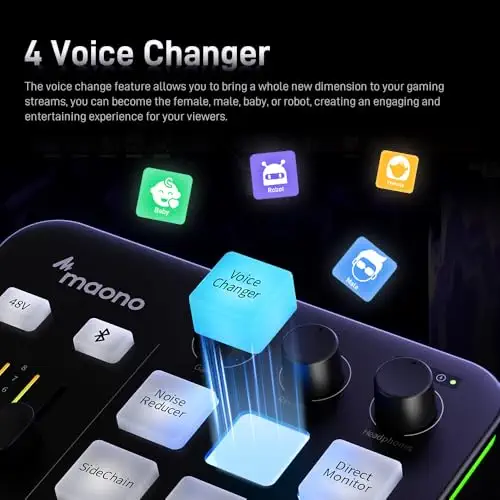


A compact mixer with four custom soundpads, 48V phantom power for XLR mics and RGB lights, built for streamers who want sound effects and voice changes during play.
Most recommended by reviewers
Check price at AmazonPrices and availability on Amazon change often.
One catchIt does not support USB microphones, so you need an XLR mic.
The MAONO G1 Neo combines the features most streamers ask for in one unit: custom soundpads, 48V phantom power for XLR microphones, and voice effects like female, male, baby and robot. The listing also covers one-click mute and loopback, which helps when you need to cut your mic or hear your own voice while streaming.
It is compatible with PC, phones, tablets, PS4 and PS5, and the listing names Discord, OBS, Twitch and YouTube among the apps it works with. If you already own an XLR mic, this is the most complete option in the list.


Four soundpads, six voice modes and inputs for up to three microphones, a good fit when more than one person talks on the same stream.
Prices and availability on Amazon change often.
The T12 is built for shared streams. Its three mic inputs let up to three people talk at once, and each has its own fader. The four soundpads and six voice modes add sound effects and humor without extra gear.
The listing describes zero-latency monitoring and a one-touch mute, which helps when a teammate's voice needs to stay clean. It also works with phones, computers and tablets, so it can move between setups.


A low-cost board with built-in sound effects, Bluetooth music input and LED lights, suited to casual voice chat, karaoke and podcasts.
Prices and availability on Amazon change often.
This is the cheapest board in the list, and it covers the basics: sound effects, Bluetooth music input and a small footprint that fits on a desk. The listing names podcasts, karaoke, live streaming and music recording as uses.
Because the listing rules out gaming devices like PS5, pick it for voice chat, karaoke or streaming on a phone or computer rather than console play.
Start with your microphone. If it is an XLR condenser, you need 48V phantom power. If it is USB, check that the board accepts it, because some listings exclude USB mics. Then count the soundpads and check that the board works with the apps you use, such as Discord, OBS or your console.
Skip the Saycker board if you play on a PS5, because its listing says it does not work with gaming devices. Skip any board that does not support your microphone type, even if the effects look appealing.
Connect the board to your PC, then select it as the microphone input in your streaming or voice app. Trigger sounds from the soundpads or buttons on the board. Listings for several of these boards describe plug-and-play setup, so no driver is required for basic use.
The PUPGSIS T12 and MAONO G1 Neo both list Discord among the apps they work with. The MAONO G1 Neo is the better fit if you use an XLR mic, and the T12 suits groups who talk on the same channel.
The MAONO G1 Neo is the most complete option for PC gaming, since its listing covers PC, PS4 and PS5. None of the listings name Roblox, so check that the board works with the app before you buy.
Why trust BullseyeBuy
Every board here was compared on its listing features: sound pads, mic inputs, phantom power, voice effects and platform support. Each pick is in stock on Amazon and is ranked on the features that matter for live sound.
Our expert team tests products when it is needed and researches online and in interviews. Every guide is fact-checked and edited by a real person.
The BullseyeBuy editorial team · Updated Oct 17, 2026
How we pickEditorial standardsAffiliate disclosureReport a mistake
We earn a commission when you buy through our links, at no extra cost to you. It never decides the winner.