 Artograph Flare 100 Digital Art ProjectorBest overall
- Resolution
- 1920 x 1080 native
- Brightness
- 300 lumens
- Contrast
- 2000:1
- Projection
- 30 to 100 inches
Most recommended by reviewers
Check price at AmazonWe earn a commission when you buy through our links, at no extra cost to you. How this works.
A sketching projector throws a reference image onto paper, canvas, a wall or even a cake, so you can trace the outline or scale a sketch up. It helps artists who want accurate lines without spending hours on guesswork. Brightness in your room, how easily you can line the image up, and how long the battery and lamp last all matter most.
Our top pick is the Artograph Flare 100. It has a 1080p screen, five built-in art grids and a monopod arm, and one expert review calls it the best value among art projectors. The other picks cover a portable model, a pocket-size one, an auto-focus budget choice and a low-cost 1080p projector for beginners.
1 Artograph Flare 100 Digital Art Projector | 2 Artograph Flare 500 HD Digital Art Projector | 3 Caydo M1C Art Projector | 4 Caydo P1 Art Projector with Drawing App | 5 JosenHoames Art Projector for Tracing and Drawing | |
|---|---|---|---|---|---|
| Best for | Best overall | Best portable | Best pocket size | Best with auto focus | Best budget |
| Resolution | 1920 x 1080 native | Not listed | 4K support | Not listed | 1080P HD |
| Projection | 30 to 100 inches | 10 to 150 inches | 10 to 100 inches | 30 to 100 inches | Not listed |
| Check price at Amazon | Check price at Amazon | Check price at Amazon | Check price at Amazon | Check price at Amazon |
Artograph Flare 100 Digital Art ProjectorBest overallMost recommended by reviewers
Check price at Amazon Artograph Flare 500 HD Digital Art ProjectorBest portable
 Caydo M1C Art ProjectorBest pocket size
 Caydo P1 Art Projector with Drawing AppBest with auto focus
 JosenHoames Art Projector for Tracing and DrawingBest budget


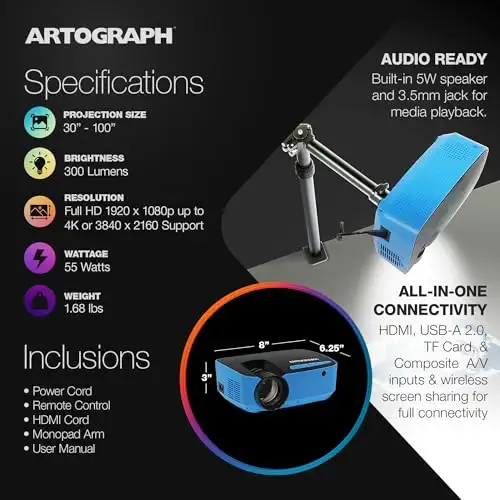

A full HD art projector with five built-in grids and a stand that aims at walls, easels or canvas.
Most recommended by reviewers
Check price at AmazonPrices and availability on Amazon change often.
One catchFocus and keystone are set by hand, unlike the auto-focus Caydo P1.
The Flare 100 is the easiest recommendation for most artists. It projects a 1080p image with 300 lumens, which is a brighter option than the pocket models here, and it has five built-in art grids to help you place a drawing on the surface.
The monopod arm lets you aim the beam at a wall, easel or canvas at different heights and angles. One expert review named it the best value among the art projectors it covered, and it sits between the pocket models and the Flare 500 in size, brightness and price. HDMI and WiFi also let you project images from a laptop or phone.


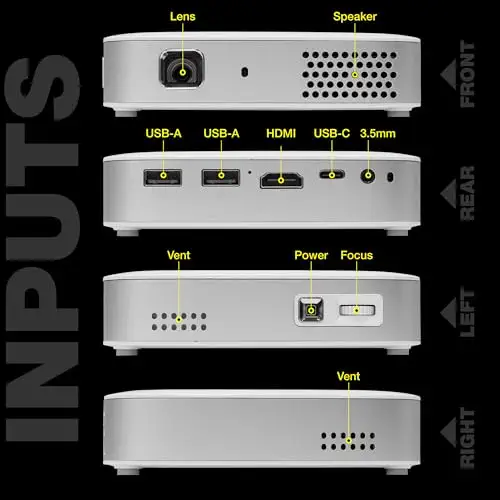

The lightest option here, under one pound, with a rechargeable battery for projecting away from an outlet.
Prices and availability on Amazon change often.
If you move between a studio, a classroom and home, the Flare 500 is the model to carry. It weighs under a pound, and its rechargeable battery gives about two hours without a cord, which covers a typical tracing session.
Its 36 grid patterns give you more ways to line up an image than the Flare 100, and the projection range from 10 to 150 inches suits both small sketches and wall-sized work. The trade-off is a 720p native screen and vertical-only keystone correction.
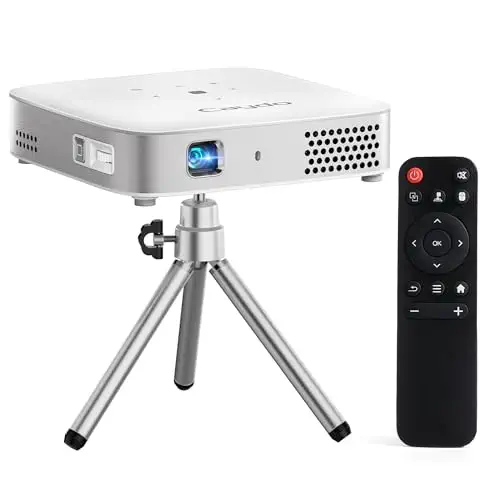
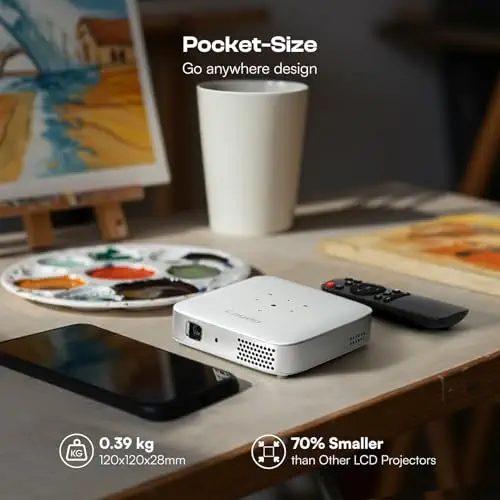


A palm-size art projector with a built-in drawing app, a tripod and a battery for projecting almost anywhere.
Prices and availability on Amazon change often.
The M1C is the smallest projector on this page, and the one to choose if you sketch at a table or want a projector that fits in a bag. It has its own battery, so you can project away from an outlet, and it comes with a tripod for holding it at a set height.
The built-in drawing app adds grids and modes to help with layout. One expert review named it the best mini projector for artists, and it is a cheaper alternative to the Flare 500. Its 110 lumens means the image is dimmer than the larger models, so dim the room before you start.


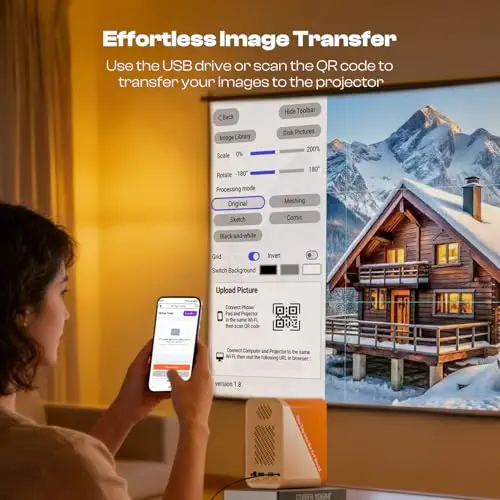

An auto-focus and auto-keystone projector that sets the image size and sharpness for you.
Prices and availability on Amazon change often.
The P1 is the pick for anyone who wants the image sized and focused without adjusting it by hand. Auto focus and auto keystone do the setup, and it works across a range from 30 to 100 inches, which covers most desk and wall sketches.
It uses 5G/2.4G WiFi, which the listing describes as faster and lower-latency than 2.4G alone, and it has a standard tripod thread. One expert review cites it as a cheaper alternative to the Flare 100, and it competes on setup rather than brightness or grid count.


A 1080p projector with browser-based control, so there is no app to install.
Prices and availability on Amazon change often.
This is the simplest setup on the page. You connect a phone or tablet to the projector's WiFi, open a browser and start projecting, without downloading an app or creating an account.
The 1080p image and dual-band WiFi suit tracing and sketching at home, and the drag, zoom and rotate controls help you line up a reference image. The listing doesn't give brightness or focus type, so check those on the product page before you buy.
Most artists should start with the Flare 100, because its 1080p image and grids cover tracing and mural layouts. If you sketch on the go, the Flare 500 and the M1C are the lightweight options. The P1 suits anyone who wants the image set up automatically, and the JosenHoames model suits beginners who don't want to install an app.
Skip the lowest-resolution models if you plan to trace fine details, because a 720p image makes small lines harder to follow. Skip any projector whose listing doesn't state brightness if you plan to draw in a lit room.
For most artists, the Artograph Flare 100 is the easiest choice. It has a 1080p image, five built-in art grids and a monopod arm for aiming at walls or easels. If you need to carry it, the Flare 500 weighs under a pound and has a two-hour battery, though its native screen is 720p.
Tracing needs a clear image, grid patterns for lining up the drawing, and a stand that holds the beam steady. The Flare 100 and the Caydo P1 both have grid patterns and a stand, and the P1 adds auto focus and keystone so the image lines up faster.
These are adult art tools, not children's toys. Reviewers of children's drawing projectors suggest checking whether a child can reset the projector and change images without help, favoring few buttons and a sturdy build. Of the picks here, the JosenHoames model has the simplest controls, but an adult should set it up and test it with the child first.
Why trust BullseyeBuy
Every listing on this page was checked for Amazon availability before it was included. We compared the specs on each listing with the expert reviews that name specific models, and weighed brightness, focus, and battery against the kind of drawing each buyer plans to do.
Our expert team tests products when it is needed and researches online and in interviews. Every guide is fact-checked and edited by a real person.
The BullseyeBuy editorial team · Updated Oct 17, 2026
How we pickEditorial standardsAffiliate disclosureReport a mistake
We earn a commission when you buy through our links, at no extra cost to you. It never decides the winner.


