 Lenovo LOQ 15Best overall
- Processor
- Intel Core i7-13650HX
- Graphics
- NVIDIA GeForce RTX 5050
- Memory
- 16GB
- Storage
- 1TB
Most recommended by reviewers
See priceat AmazonWe earn a commission when you buy through our links, at no extra cost to you. How this works.
If you want to play modern games without spending much, the budget gaming laptop market is crowded and the spec sheets are misleading. A lot depends on the GPU's sustained power limit and cooling, not just the name on the box.
Our top choice is the Lenovo LOQ, which owners and reviewers both point to for a good balance of graphics power, display and value. The HP Victus and MSI Thin cover different needs, and the sections below explain who each one suits.
1 Lenovo LOQ 15 | 2 HP Victus 15 | 3 HP Victus 15 | |
|---|---|---|---|
| Best for | Best overall | Best for a quiet, easy setup | Best for portability and value |
| Processor | Intel Core i7-13650HX | Intel Core i5-13420H (8 cores) | Intel Core i5-12500H |
| Graphics | NVIDIA GeForce RTX 5050 | NVIDIA GeForce RTX 3050 6GB | NVIDIA GeForce RTX 3050 |
| Memory | 16GB | 8GB DDR4 | 8GB |
| Storage | 1TB | 512GB NVMe SSD | 512GB SSD |
| Display | 15.6-inch FHD IPS, 144Hz, G-Sync | Not listed | 15.6-inch FHD IPS |
| See priceat Amazon | See priceat Amazon | See priceat Amazon |
Lenovo LOQ 15Best overallMost recommended by reviewers
See priceat Amazon HP Victus 15Best for a quiet, easy setup
 HP Victus 15Best for portability and value


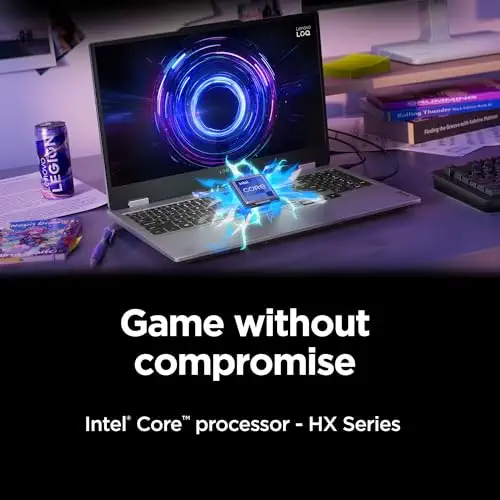


A well-rounded budget gamer with a 144Hz screen and G-Sync, at a price that often falls below its list.
Most recommended by reviewers
Check price at AmazonPrices and availability on Amazon change often.
For a budget gaming laptop that gets the most out of your money, the Lenovo LOQ 15 with an Intel Core i7-13650HX and RTX 5050 is the pick we'd make.
The LOQ pairs a 144Hz FHD IPS display with G-Sync, which is a smoother experience than most budget screens offer. It also comes with 16GB of RAM and 1TB of storage, the most memory of the three picks, and Lenovo's AI Engine+ automatically tunes the CPU and GPU for better frame rates. One reviewer noted it performs well and ranks among the best for GPU results. Owners on the subject of loudness and deck flex are less enthusiastic, though. Owners on r/GamingLaptops report that the LOQ exceeds expectations for value and handles 1080p gaming well at its price.
The main catch is noise and flex. Reviewers found the LOQ loud during gaming, and the deck flexes noticeably under load. Its cooling system helps keep temperatures in check, but you should expect fan noise when pushing it hard.
If it's not for you, the HP Victus 15 with the i5-13420H suits buyers who want a quieter, lighter setup and a slick blue design, though its 8GB of RAM is tight for modern games.
The LOQ pairs a capable i7 with an RTX 5050 and 16GB of memory, which covers the bulk of current esports and mid-demand titles. The 144Hz G-Sync panel is the feature most budget machines skip. Expert coverage places it third overall, and owners in community threads recommend it for the same reason.
Expect some fan noise and chassis flex under sustained load. If that bothers you, a headset and a lap desk make the experience much better.


A lightweight budget option with a clean design and a 144Hz display, suited to light to medium gaming.
Prices and availability on Amazon change often.
The HP Victus is the choice when you want a light machine that handles esports titles and older games without a big outlay. Owner discussions praise the 144Hz screen for competitive play. Its 8GB of memory and RTX 3050 are the limits; step up to 16GB if you can, and expect to lower settings in newer releases.

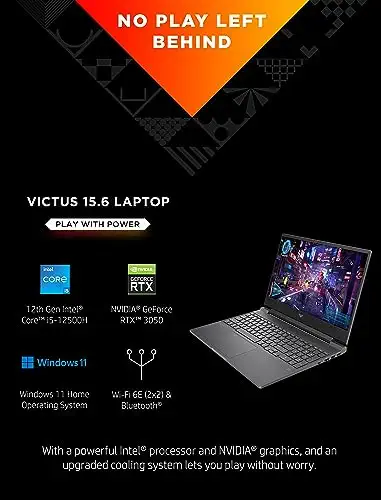


An older-gen Victus with a 12th-gen i5 and RTX 3050, a cheaper route into 1080p gaming.
Prices and availability on Amazon change often.
This is the cheapest path into an RTX 3050 laptop. It is a sensible buy for light gaming and schoolwork, but the older chip and limited memory show in demanding titles. Compare its price against the newer Victus above before buying.
Look for at least 16GB of RAM, 512GB of storage and a dedicated NVIDIA GPU. Check the GPU's wattage in the listing, since two RTX 4060s can perform very differently at different power limits. A 144Hz screen is a useful extra for competitive games.
Skip ultra-thin machines marketed as gaming laptops in this price band, since thinness usually means weaker sustained performance. If you travel often or need long battery life, a lighter laptop may serve you better than a gaming model.
For most budget gaming, 16GB is enough. 32GB is useful if you multitask heavily or run demanding modern titles alongside other apps.
Owners report four to six years of regular use for well-built models, and some report longer. Battery wear and thermal paste degradation are the usual limits.
Often, yes. Expert reviews note weak speakers and small touchpads, so a headset and gaming mouse are common additions.
Why trust BullseyeBuy
three Amazon listings were checked for stock, price and configuration.
Our expert team tests products when it is needed and researches online and in interviews. Every guide is fact-checked and edited by a real person.
The BullseyeBuy editorial team · Updated Nov 5, 2026
How we pickEditorial standardsAffiliate disclosureReport a mistake
We earn a commission when you buy through our links, at no extra cost to you. It never decides the winner.
